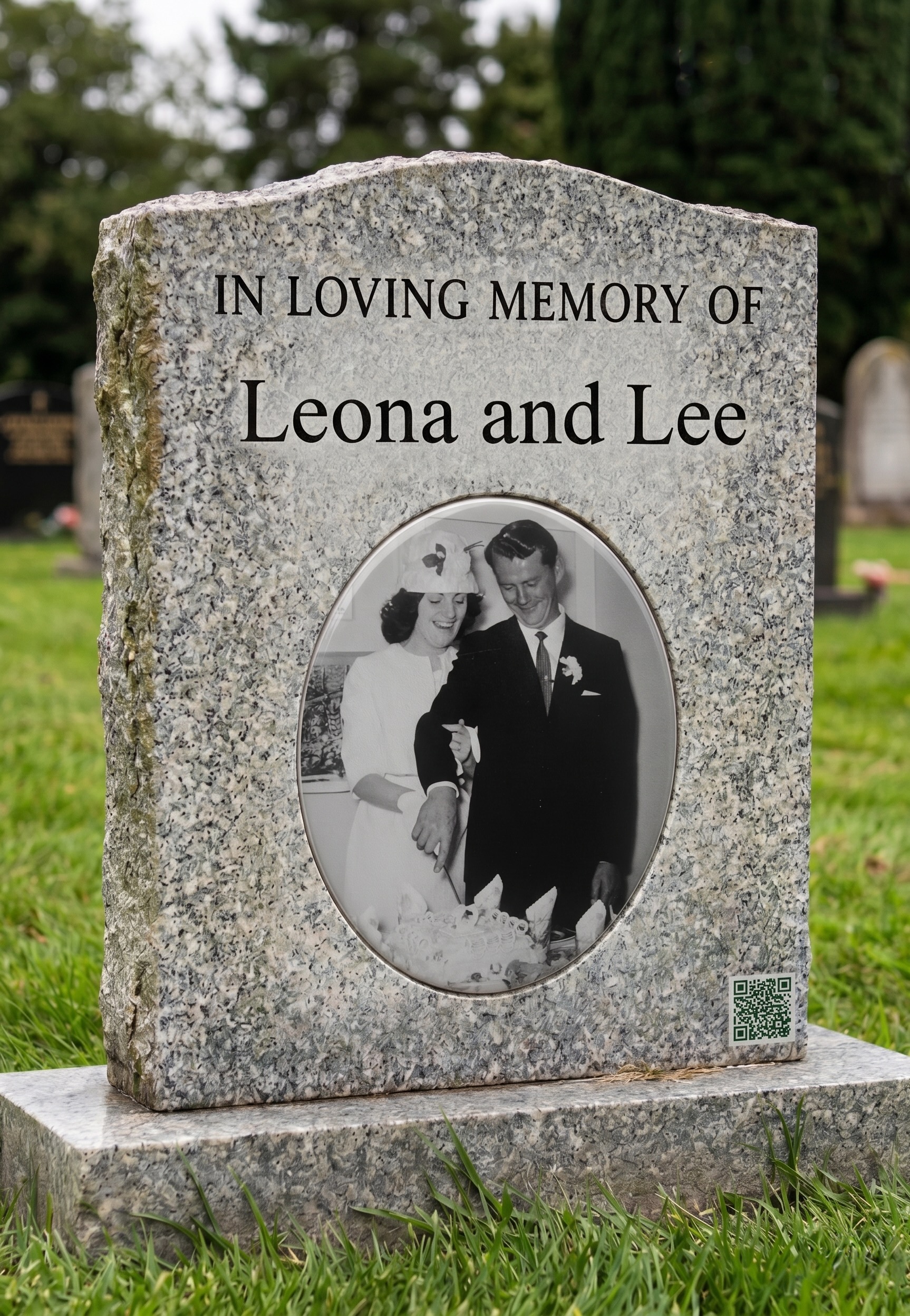
A growing number of families are choosing to have a small QR code engraved into a headstone, grave marker, or memorial plaque — a quiet bridge between the physical place of remembrance and a fuller story held safely online. If you are considering it, here is what the process actually involves, what to ask your stonemason, and how to make sure the code still works exactly as it should, however many years from now someone first scans it.
Why families are choosing to do this
A headstone can hold a name and two dates, and very little else. It cannot hold the sound of someone's laugh, the photographs from a fiftieth birthday, or the small stories that made them who they were. A QR code changes that. Carved permanently into the stone, it becomes a doorway: anyone standing at the grave — a grandchild who never had the chance to meet them, an old colleague passing through town, a friend visiting after many years away — can take out their phone, scan the code, and see the person as they were remembered, not just as they are recorded.
It costs nothing to add once the memorial exists, takes only moments to scan, and never needs replacing or maintaining. For many families, that combination — permanence, simplicity, and depth — is what makes it feel worth doing.
How the engraving process works
Most monumental masons and engravers are now familiar with QR codes, even if they do not engrave them every day. The process is straightforward from their side: they receive an image file of the code, scale it to the size agreed for the stone, and either sandblast, hand-carve, or laser-etch it into the surface — the same techniques already used for lettering, motifs, and emblems.
The part that matters most happens before the file ever reaches the mason: making sure the code itself is generated correctly for this purpose.
Choosing the right QR code for stone
Not every QR code is suited to engraving. A code copied from a phone screenshot, or generated by a free online tool at low resolution, will often look blocky or lose definition once enlarged — and on stone, where there is no backlight and no colour contrast to help, that loss of sharpness can be the difference between a code that scans instantly and one that frustrates everyone who tries.
Two things matter most:
- Resolution or vector format — a code generated at high resolution (or, better still, as a vector file such as an SVG) can be enlarged to any size on the stone without becoming pixelated or losing the crisp edges that a scanner relies on.
- Error correction — QR codes are designed to remain readable even when part of the pattern is obscured, worn, or weathered. Codes generated with a high error-correction level tolerate the texture and imperfections of natural stone far better than a basic code would.
Every Memory Keep memorial includes a QR code generated specifically with this in mind — a high-resolution PNG for general use, and a clean vector SVG intended for exactly this kind of engraving and professional print work, with strong error correction built in from the start. Both are available to download from the QR Code tab in the memorial dashboard, in a choice of simple styles designed to remain legible at any size. If you are a monument mason or engraver, our page for professionals sets out the file format and engraving specifications in more detail.
Working with your stonemason or monument company
When you meet with the mason or monument company, it helps to bring:
- The downloaded QR code file (the vector SVG, where the supplier can use it, gives the cleanest result at any size)
- A note of the web address the code points to, so they can test it themselves once it is ready
- A sense of where on the stone you would like it placed, and roughly how large
Most suppliers will be glad to produce a proof or sample engraving first. It is well worth asking for one, and scanning it yourself with two or three different phones before any final work begins. A minute spent checking now saves any disappointment later.
Where to place it on the stone
There is no single right answer — it depends on the design of the headstone and the family's preference. Common choices include:
- A lower corner of the front face, where it sits quietly alongside the inscription without competing with it
- The back of the stone, keeping the front traditional while still offering the code to anyone who knows to look
- A small separate plaque or marker placed at the base, which can be added without altering the headstone itself — often the simplest option for an existing memorial
A short line of engraved or printed text beside the code — "Scan to see [Name]'s story" — helps anyone unfamiliar with the idea understand immediately what to do.
Getting the size and contrast right
As a general guide, an engraved code should be no smaller than around 5 to 6 centimetres (roughly 2 to 2½ inches) square — smaller than that, and the fine detail in the pattern can become difficult for a phone camera to resolve, especially in low light or at an angle. Your mason will be able to advise on the right size for the specific stone, taking into account how deeply it will be engraved and how the surface is finished.
Contrast matters too. A code that is sandblasted into a polished, dark granite — creating a pale, matte pattern against a glossy background — will usually scan more easily than one engraved into a light, uniformly textured stone where the pattern blends into its surroundings. This is exactly the kind of detail an experienced monumental mason will already be thinking about, so it is worth raising directly in your first conversation.
Will it still work, years from now?
This is the question families ask most often, and it is a fair one. The engraving itself will not fade or wear in any meaningful way — stone is, after all, chosen for memorials precisely because it lasts. What matters is what the code points to: the address has to remain active for the code to mean anything.
This is why it is worth choosing a memorial built to last, rather than a free tool with no long-term commitment behind it. A Memory Keep memorial is a one-time purchase, with no subscription to lapse and no renewal to be missed years from now by someone who has long since stopped thinking about it. The memorial — and the address the engraved code points to — is intended to remain exactly where it was left, for as long as the service exists.
Getting your code ready
If you are planning to have a code engraved, the most useful thing you can do first is finish building the memorial itself — adding the photographs, the tribute, and anything else you would like held there — so that the very first time someone scans the stone, they find a complete and finished place, not a page still being built. Once the memorial is ready, the QR code waiting in the dashboard is ready too, in the right format, at the right resolution, for whoever you choose to carry the work forward in stone.