
An online memorial page is a permanent, shareable web page where photos, stories, videos, and tributes come together to honor someone you love. For most families, the single best next step is to choose a platform that offers a unique shareable link, collaborative uploads, and clear privacy controls — so the people who matter most can find the memorial, contribute to it, and return to it for years to come.
Before you build, gather these essentials:
-
A selection of photos and any video clips you want to include
-
A brief life summary or obituary text
-
Contact information for family members you want to invite as contributors
-
A decision on privacy: public, link-only, or invite-only
-
Any funeral or service details you want to share alongside the tribute
Key Takeaways
A permanent online memorial page needs shareable links, collaborative uploads, privacy controls, and a clear data-ownership policy before it is ready to publish and share.
| Point | Details |
|---|---|
| Start with the right features | Prioritize shareable links, collaborative uploads, a guestbook, and export options above all else. |
| Check permanence before committing | Ask whether the page survives a lapsed payment and whether you can export all content in standard formats. |
| Privacy defaults matter | Set access to link-only or invite-only first; you can always open the page to the public later. |
| QR codes extend the memorial | A durable engraved plaque on a headstone or card connects the physical memorial to the digital one permanently. |
| Memory Keep offers a one-time upgrade | A single $15 payment per memorial unlocks unlimited photos, videos, QR codes, and downloadable keepsakes with no renewal. |
Table of Contents
-
What does an online memorial page cost, and how long will it last?
-
Privacy, access control, and content ownership: what to check before you publish
-
How to connect a physical memorial to your online page with QR codes
What does an online memorial page actually include?
A digital memorial page is a dedicated web space that holds everything a family wants to preserve about a person or pet they have lost. Unlike a printed obituary, it lives online indefinitely, can be updated at any time, and is accessible to anyone with the link, anywhere in the world.
Memorial websites typically include a combination of these elements:
-
Photos and videos: A gallery of images and clips spanning a lifetime
-
Life story or obituary: A written tribute covering key milestones, personality, and legacy
-
Guestbook: A space where visitors leave messages of remembrance and condolence
-
Timeline: A chronological map of life events, places, and milestones
-
Shareable link: A unique URL families can text, email, or post on social media
-
QR code: A scannable code printed on a headstone, urn, or memorial card
-
Downloadable keepsakes: Photo books, slideshow videos, or printed tributes
Common uses include replacing or supplementing a printed obituary, serving as a collaborative family photo archive, hosting funeral and service details, collecting tributes from friends scattered across the country, and creating a lasting memorial for a beloved pet.
Why families choose to create a tribute page
Grief arrives without warning, and the people who loved someone are rarely all in the same room. An online tribute page solves that distance problem in a way a single service or a printed program never can.
The practical and emotional benefits are real:
-
Global reach: Family and friends anywhere in the world can visit, contribute, and feel connected to the remembrance
-
Permanence: Unlike social media posts that scroll away, a dedicated memorial page stays in place
-
Multimedia storytelling: Photos, audio, and video together capture a person’s voice, humor, and presence far more fully than words alone
-
Collaborative contributions: Relatives and friends can upload their own photos and leave tributes, building a richer picture than any one person could create alone
-
Fundraising and donations: Many platforms allow a charity or memorial fund link alongside the tribute
That kind of permanence is what separates a thoughtfully built memorial page from a Facebook post. The benefits of an online memorial extend well beyond the first weeks of mourning; families return to these pages on birthdays, anniversaries, and quiet moments for years.
What features should every good memorial page have?
Not every platform offers the same depth, and the features that matter most depend on whether you want a simple tribute or a living family archive. Use this checklist when you evaluate your options.
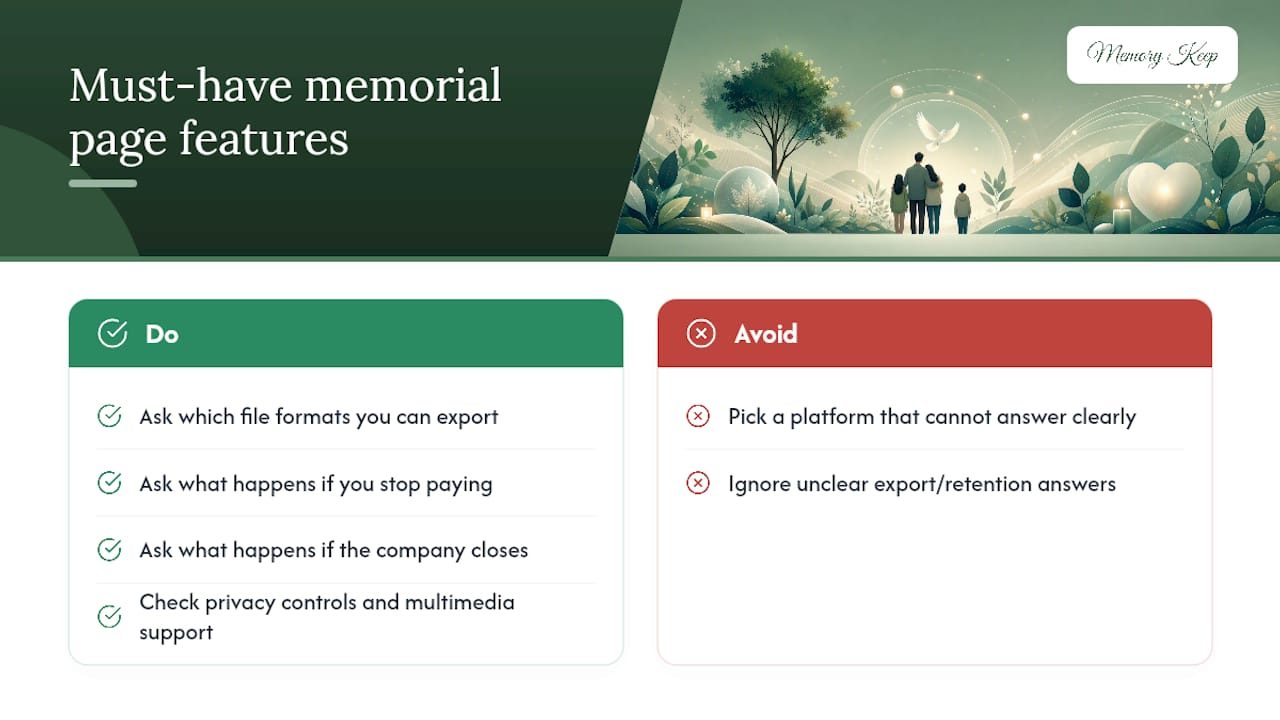
Comparison guides consistently surface the same top criteria: ease of use, multimedia support, privacy controls, pricing model, and long-term data retention. If a platform cannot answer clearly on any of those five points, that is a signal worth taking seriously.
Pro Tip: Ask every platform two questions before you commit: “What file formats can I export my content in?” and “What happens to the memorial if I stop paying or the company closes?” A platform that cannot answer both clearly is not built for permanence.
How to create an online memorial page, step by step
The process is gentler than most people expect. These steps move from preparation through publishing and sharing.
-
Gather your materials. Collect photos, videos, and any audio clips. Scan printed photos if needed. Note the permissions situation: if friends or other family members own some of the photos, ask before uploading.
-
Write a concise life summary. Aim for 200–400 words covering the person’s life, personality, and what they meant to the people who loved them. You can always expand it later.
-
Choose your privacy setting. Decide whether the page will be public, accessible only to people with the link, or restricted to invited contributors. Start more private and open up later if you choose.
-
Enable collaborative uploads. Turn on the feature that lets family and friends add their own photos and leave tributes. Send invitations before you announce the page publicly.
-
Publish and test the share link. Open the link on a phone and a desktop to confirm everything displays correctly. Check that photos load, the guestbook works, and the life story reads as intended.
-
Share the link widely. Text it, email it, post it on social media, and print it as a QR code for service programs or sympathy cards.
| Step | What to do | Common pitfall to avoid |
|---|---|---|
| Gather materials | Collect and organize photos, videos, audio | Uploading blurry or duplicate images |
| Write life summary | Draft 200–400 words; focus on personality and legacy | Making it feel like a resume rather than a tribute |
| Set privacy | Choose public, link-only, or invite-only | Leaving a sensitive page fully public by default |
| Enable collaboration | Invite contributors before announcing publicly | Forgetting to notify family before strangers find the page |
| Publish and test | Check on mobile and desktop | Publishing before testing the share link |
| Share | Text, email, social, QR code | Sharing only once; remind people the page exists on anniversaries |
For creating a lasting digital memorial, the most overlooked step is the final one: sharing the page more than once. A single announcement gets lost. Returning to the memorial on a birthday or the anniversary of a loss keeps the community connected.
What does an online memorial page cost, and how long will it last?
Pricing models vary widely, and the cost structure often signals how a platform thinks about permanence.
Memory Keep uses a freemium model: the free plan lets you start a memorial and explore the features, and a one-time $15 upgrade per memorial unlocks unlimited photos, videos, and all premium features. There is no annual renewal required to keep the page live.
Before committing to any platform, ask these questions:
-
Does the page stay live if I stop paying, or does it disappear?
-
Who owns the content I upload?
-
Can I export my photos and text in a standard file format?
-
Is there a backup system, and how often does it run?
Family-focused guides for 2026 consistently flag long-term retention as one of the most important and most overlooked factors. A memorial that disappears after a lapsed subscription is not a memorial — it is a rental.
Privacy, access control, and content ownership: what to check before you publish
Sensitive materials deserve careful handling. Most platforms offer several access levels, but the defaults are not always what you would choose.
Common access control options:
-
Public: Anyone can find and view the page via search or a direct link
-
Link-only (unlisted): Only people with the URL can access it; not indexed by search engines
-
Password-protected: Visitors must enter a password to view content
-
Invite-only contributors: Only named individuals can upload photos or leave tributes
On content ownership, read the platform’s terms carefully. You should retain full ownership of every photo, video, and written tribute you upload. The platform’s right to display your content should end the moment you delete it or close the account.
Moderation matters too. Confirm who can remove an inappropriate guestbook entry, how quickly the platform responds to takedown requests, and whether you as the page creator have full moderation authority.
Pro Tip: Before publishing, download a local backup of every photo and document you upload. Store it in a cloud folder (Google Drive, iCloud, or Dropbox) and on an external hard drive. No platform is permanent by default; your own backup is.
How to connect a physical memorial to your online page with QR codes
A QR code printed on a headstone, urn, or memorial card gives anyone with a smartphone instant access to the full digital memorial. The setup takes less than an hour.
-
Generate a stable short link. Use the unique URL your platform provides, or create a short redirect (via a service like Bitly) so the destination can be updated without reprinting the QR.
-
Create a high-contrast QR code. Black on white, at least 1.5 inches square for outdoor use. Test it with three different phones before ordering anything.
-
Choose durable material. For headstones and outdoor plaques, laser-engraved stainless steel or ceramic-coated aluminum holds up to weather far better than printed stickers or resin overlays.
-
Test scanning in place. Before the plaque is permanently installed, hold it at the angle it will sit and scan it in varying light conditions.
-
Check cemetery rules. Many cemeteries have policies on what may be affixed to or near a headstone. Contact the cemetery office before ordering a plaque. Some require pre-approval; others prohibit adhesive attachments entirely.
Memory Keep’s QR code feature page walks through the full setup process and shows how the generated QR links directly to the memorial.
How to use your memorial page to host a virtual service
A memorial page can serve as the hub for a virtual service, not just an archive. Families spread across multiple time zones have used this approach to bring everyone together without travel.
Before the service:
-
Confirm your streaming platform (Zoom, YouTube Live, or a funeral home’s own service) and embed or link the stream from the memorial page
-
List the date, time, and time zone clearly; include a converter link for guests in other regions
-
Run a full tech test at least 24 hours before the service
During and after:
-
Enable collaborative photo uploads so guests can contribute images from their own collections during or after the service
-
Record the stream and add it to the memorial page within 24 hours so those who could not attend can watch
-
Update the page with highlights, a written summary, and any readings or music shared during the service
Accessibility considerations are worth the extra few minutes. Include a clear contact link or email address on the page so visitors who have trouble accessing the stream or the memorial itself can reach someone for help. Not everyone is equally comfortable with technology, and grief is not the moment to leave someone behind.
How to choose the right online memorial platform
The right platform is the one that fits your specific needs, not the one with the longest feature list. Use this checklist to narrow your options.
Decision checklist:
-
Feature fit: Does it support photos, video, a guestbook, and a life story editor?
-
Ease of use: Can a non-technical family member add photos without help?
-
Privacy controls: Does it offer link-only or invite-only access?
-
Export and backup: Can you download all content in standard formats?
-
Cost model: Is it a one-time fee, a subscription, or free with limitations?
-
Grief support resources: Does the platform offer writing helpers or grief guidance?
-
Customer support: Is there a human to contact if something goes wrong?
Questions to ask any vendor:
-
Who owns the content after upload?
-
How long is the page hosted, and what happens if the company closes?
-
What is the moderation policy for guestbook entries?
-
Does the platform support QR code generation?
-
Can I transfer the memorial to another account or export it entirely?
Pro Tip: Ask to see a live example memorial before you sign up. A platform confident in its product will show you one. If the only examples are screenshots or demo videos, that is worth noting.
Choosing a memorial platform is a decision that deserves the same care as any other part of honoring someone you love. The criteria that comparison guides return to most often are ease of use, multimedia support, privacy controls, pricing, and long-term retention — and those five points are a reliable filter for any platform you consider.
What we believe about building memorial pages with care
At Memory Keep, we think about memorial pages the way families think about the people they are honoring: with patience, attention, and a deep respect for what is being preserved. Every photo uploaded to a memorial page is irreplaceable. Every message left in a guestbook is a small act of love. The platform that holds those things carries a real responsibility.
We also know that grief does not follow a schedule. Some families build a memorial in the days immediately after a loss; others return months later, when the initial weight has lifted enough to sit with memories. A good platform should be ready for both. It should be gentle enough for someone in acute grief and complete enough for someone who wants to build something lasting.
Handling sensitive content respectfully means giving families full control: over who sees the page, who can contribute, and what stays. It means never making a memorial feel like a product. And it means being honest about permanence, because a memorial that disappears is a second loss.
Memory Keep covers every item on the checklist
Memory Keep was built specifically for families who want a permanent, beautiful memorial without a technical learning curve or an ongoing subscription fee. The full feature set maps directly to the checklist above: unlimited photos and videos after a one-time $15 upgrade, collaborative uploads for family and friends, a guestbook, a life story editor, an interactive timeline and map, a unique shareable link, QR code generation for headstones and keepsakes, and downloadable photo books and slideshow videos.
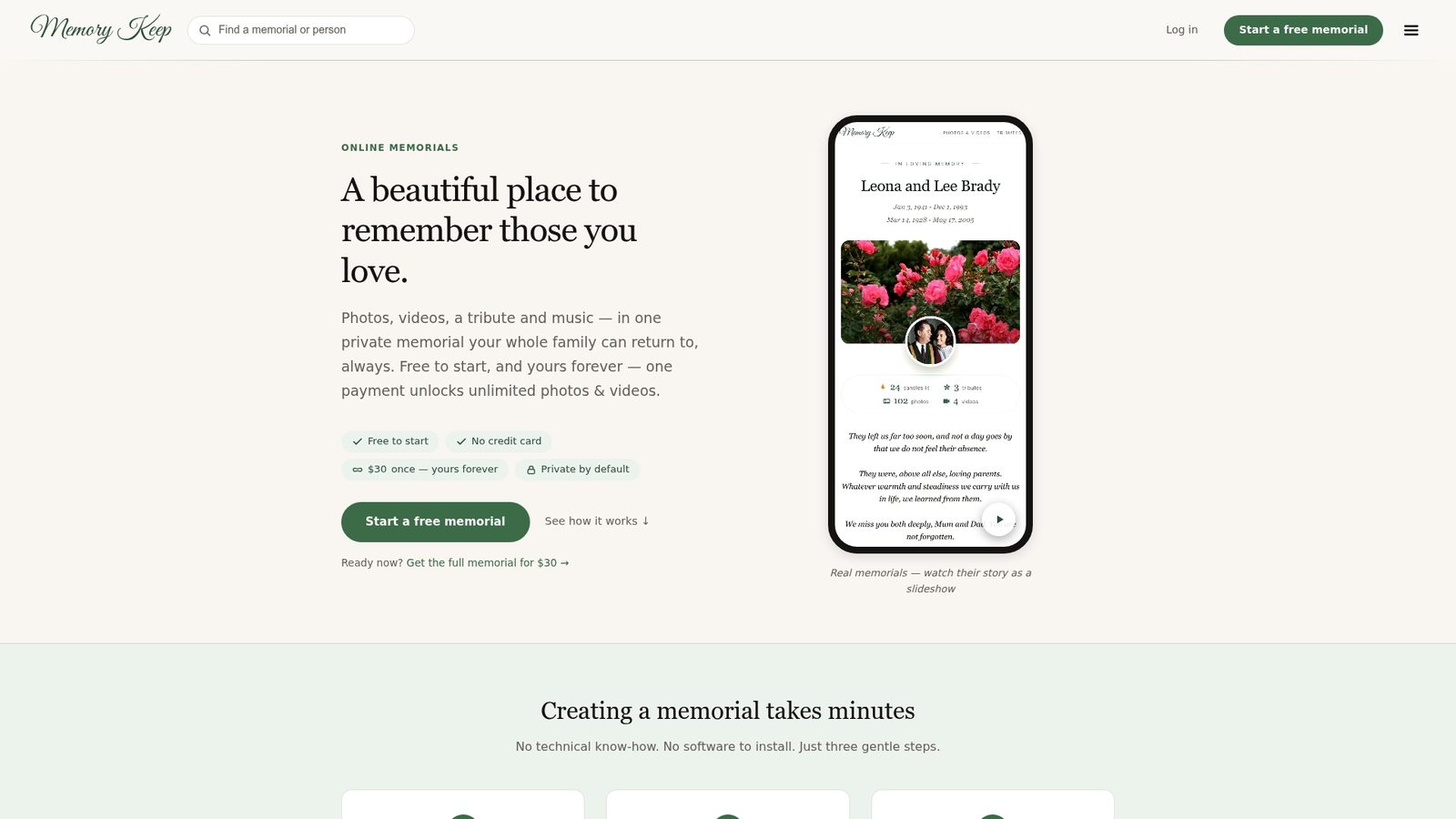
The free plan lets you start immediately, explore the memorial builder, and invite family members to contribute before you decide whether to upgrade. There is no subscription to cancel and no annual renewal to worry about. When you are ready to see what a finished memorial looks like, the example memorial for Maurice J. Wizniak shows the full feature set in use, and Memory Keep also supports pet memorials with the same care and permanence. Visit Memorykeep to start a memorial today, free.