
How to Share a Memorial on Facebook, Gently and Safely
You can share a memorial on Facebook in two ways. You can ask Facebook to memorialize your loved one’s profile, so friends can gather there. Or you can build a lasting memorial page elsewhere and post its link on Facebook, so the people who loved them can find it. Many families do both, and this guide walks you through each step at a pace that respects what you are carrying.
Grief arrives without warning, and so do the practical questions that come with it. Who can see the profile? Can anyone still log in? Where do the photos go? We will answer these plainly, one at a time.
TL;DR
- Facebook can memorialize a profile, which adds “Remembering” beside the name and keeps the account from being logged into. Meta’s policy page describes this.
- Without a legacy contact, you will usually need to send documentation, such as a death certificate or proof of authority.
- Facebook is a good place to gather in the first days. A dedicated memorial page gives photos, videos, and stories a permanent home you control.
- Sharing the link to a memorial page in a Facebook post lets friends and relatives anywhere visit and leave messages.
- Check the audience on every post before you share, especially photos of children and private moments.
Table of Contents
- What “memorializing” a Facebook profile actually means
- How to request memorialization, step by step
- Sharing memories in the Tributes space
- Memorial profile, group, or page: choosing a Facebook space
- Why a memorial page and a Facebook post work well together
- How to share your Memory Keep link on Facebook
- Inviting family to add their own memories
- Privacy and boundaries to protect your family
- Our perspective: a memorial should outlast a feed
- Start a memorial you can share anywhere
- A short checklist before you post
- FAQ
- Sources
What “memorializing” a Facebook profile actually means
Memorialization is Facebook’s way of putting a gentle pause on an account. When someone passes away, friends and family can ask that the account be memorialized, and the word Remembering is added above the person’s name on the profile, according to Meta’s Transparency Center. The profile stays up, frozen where it left off.
Meta also explains a protective purpose: memorialization helps guard accounts against fraud and unauthorized login attempts after a death. That is worth knowing, because many families worry about a stranger gaining access to an account that belongs to someone they love.
Some things change, and some do not:
- No one can log in. A memorialized account cannot be signed into, and a legacy contact cannot post as the person or read their private messages, as summarized by Empathy.
- Privacy stays as it was. The original privacy settings remain in place, so posts and photos can still be seen by the audience they were first shared with, per Android Police’s walkthrough.
- The profile quiets down. Memorialized profiles do not appear in ads, People You May Know suggestions, or birthday reminders, according to Empathy.
That last point matters more than it sounds. Many of us have felt the small shock of a birthday reminder for someone we have lost. Memorialization spares your family that.
How to request memorialization, step by step
The path depends on whether your loved one set things up before they died.
If they named a legacy contact
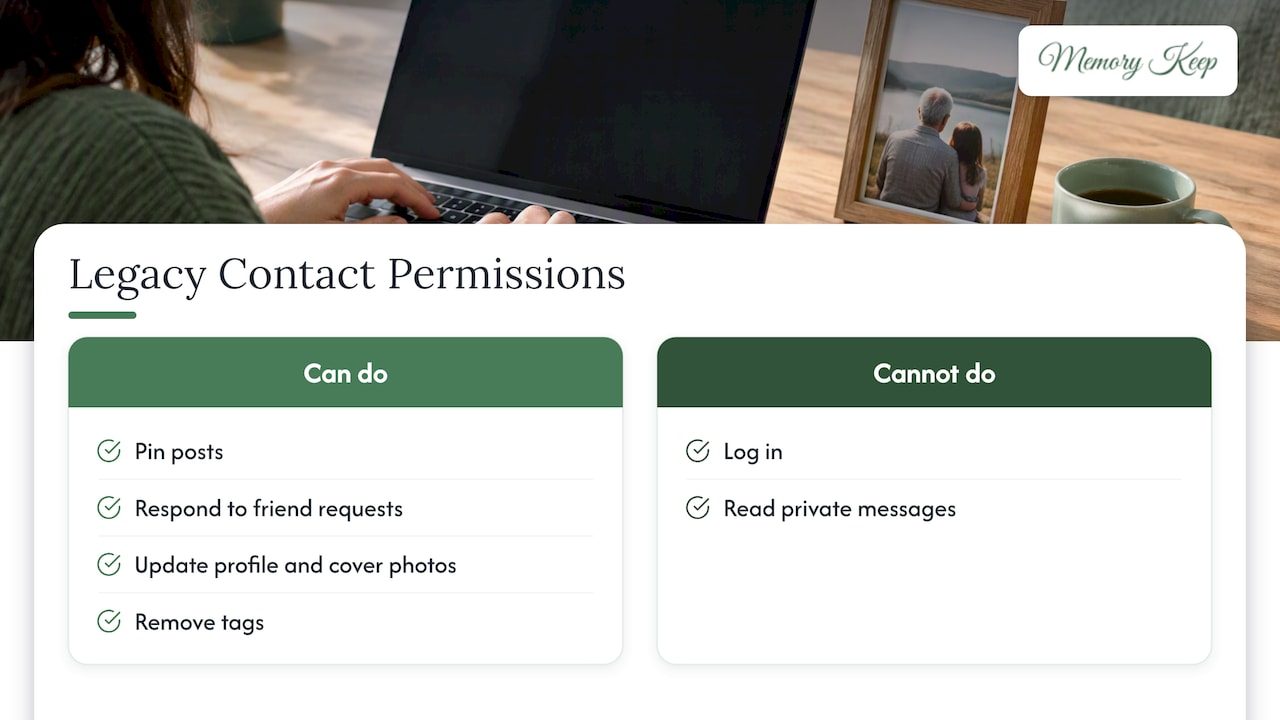
A legacy contact is someone a person chooses to look after their account. A legacy contact can pin a post, respond to new friend requests, update the profile and cover photos, and remove tags. They cannot log in or read private messages, according to Android Police. If the account owner allowed it, the legacy contact may also download a copy of the person’s data.
The legacy contact can also decide who may post and view Tributes, and can delete posts that are inappropriate, per Empathy.
If they did not
You can still ask Facebook to memorialize the account. Here is the usual order:
- Open the profile and copy its link. Keep the person’s username and the email on the account if you know them.
- Find the memorialization request form in Facebook’s Help Center by searching for memorializing the account of someone who has died. You do not need the person’s password, and Facebook will not give it to you.
- Gather documentation. Facebook asks for the person’s username and account email. A death certificate is needed. If you do not have one, Empathy reports that proof of authority (a will, letters testamentary, a birth certificate, or power of attorney) plus proof of death (an obituary or memorial card) can stand in.
- Submit the form and give it time. Requirements can change, so read the form’s current instructions as you fill it in.
If the form will not go through, you are not alone. Families in public forums describe trying several times. Wait a little, try again from a different browser, and check that every field is filled in. If you are the executor, keep your paperwork together; you will need it for other accounts too.
If you would rather not memorialize
Memorialization is a choice, not an obligation. If you want the account gone, you can ask Facebook to delete it entirely, with the same proof of death and authority, per Empathy. Some families download photos first, so nothing is lost. Take the time you need. Nothing about this has to be decided in the first week.
If you want to plan ahead for yourself, USA Today explains that you can set your own memorialization preferences under Settings & Privacy, then Settings, Accounts Center, Personal Details, Account ownership and control, and Memorialization. You must be at least 18 to choose a legacy contact, per Android Police.
Sharing memories in the Tributes space
Once a profile is memorialized, friends and family can share memories in a dedicated Tributes space, TechRadar reported when the feature arrived. It gives public mourning a more structured home on the platform.
The legacy contact has control here. They can limit who posts and sees Tributes and remove anything that feels wrong, which is a comfort if a comment turns unkind or a distant acquaintance posts something that hurts.
A few gentle ideas for what to share in Tributes:
- A short story that shows who they were, such as the way they laughed or the recipe everyone asked for.
- A photo from an ordinary day, not only the big occasions.
- A line of thanks, which is often the easiest thing to write when words feel far away.
If you are stuck on a short tribute message, keep it to a sentence or two: “I will always remember how you made every room feel warmer. Thank you for loving us so well.” Short and true is enough.
Memorial profile, group, or page: choosing a Facebook space
A memorialized profile is not the only place to gather. Families often start a private group so relatives can share memories away from the wider feed. Groups give family and friends a private setting to come together, as one popular guide to memorializing relatives on Facebook points out.
| Option | Best for | Who controls it | Things to keep in mind |
|---|---|---|---|
| Memorialized profile | Friends who already know the person on Facebook | Legacy contact, if one exists | No one can log in; original privacy settings stay |
| Private group | Close family and friends sharing stories | Group admins | Members need a Facebook account |
| Link to a memorial page | Everyone, including relatives who are not on Facebook | You, the page creator | Content lives on its own page, so it is not tied to one platform |
None of these is wrong. They simply serve different moments. The profile is where people gather in the first days. A group is a living room for the family. A separate memorial page is the keepsake.
Why a memorial page and a Facebook post work well together
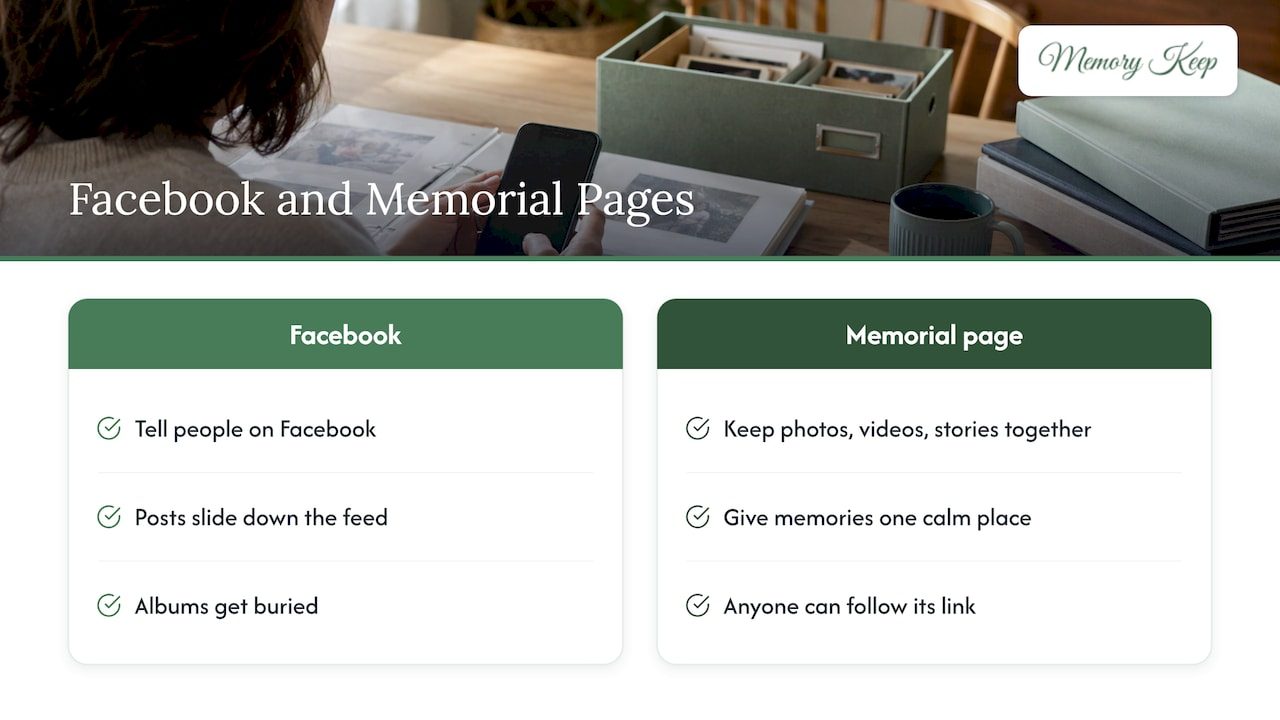
Facebook is where many of us already are, which makes it a natural place to tell people. But a feed is built for what is happening now. Posts slide down, albums get buried, and not everyone who loved your person has an account.
A dedicated memorial page keeps the photos, videos, and stories together in one calm place. You share its link on Facebook, and anyone can follow it. Our article on the benefits of creating and sharing an online memorial explains why many families find this helps them hold on to memories.
Facebook is where we tell people. A memorial page is where the memories stay.
If you want a broader list of ways to honor someone without spending much, our online remembrance ideas are a good next read.
How to share your Memory Keep link on Facebook
Every Memory Keep memorial has a unique link, so you can share it with family and friends anywhere in the world. Here is a simple way to post it with care.
- Open the memorial and copy its link.
- Start a new Facebook post, or add it to a Tribute if the profile is memorialized.
- Write a few words first. A short note such as “We created a place to keep Dad’s photos and stories. Please visit and leave a memory” invites people in.
- Choose the audience. Public lets anyone see the post. Friends or a custom list keeps it closer. Pick deliberately.
- Post, then pin it. If you are the legacy contact, you can pin a post to the top of a memorialized profile, per Android Police, so the link is the first thing visitors see.
If the memorial is private, a post only works for people you intend to let in. Think about who should receive the link, and share it in a group or a message rather than on a public timeline.
Using a QR code beyond Facebook
Not everyone gathers online. Each Memory Keep memorial includes a free scannable QR code, which families can print on a funeral program, a thank-you card, or a headstone marker. A relative who never opens Facebook can scan it and arrive in the same place as everyone else.
Inviting family to add their own memories
Grief is lighter when it is shared. One person rarely holds every story, and a memorial grows richer when cousins, coworkers, and old friends add their own photos and videos. Our guide to a collaborative memorial page shows how families do this together.
Visitors can also leave messages of remembrance, which gives quieter people a gentle way to take part. Many will not post publicly on Facebook but will happily write a few private lines on a page.
If the person you lost was a parent and the surviving parent is struggling, practical, kind support helps too. What widowed parents actually need goes beyond the casseroles to the quieter ways people can show up.
Privacy and boundaries to protect your family
Sharing is generous, and it deserves a few guardrails.
- Review old posts. On a memorialized profile, content stays visible to its original audience, per Android Police. If something private was shared widely, a legacy contact may be able to remove tags, but they cannot read messages.
- Think before posting photos of others. A group photo includes people who may not want to be seen. Ask first, or crop.
- Ask relatives what they are comfortable with. Some want to post at once. Others need weeks.
- Choose a platform that respects privacy. We built Memory Keep with no ads and no selling of data, so a memorial stays a memorial.
Safety first: if someone is impersonating your loved one or you suspect fraud, report it to Facebook through its Help Center, and contact your bank if financial accounts may be at risk. Meta notes that memorialization is meant to protect accounts from unauthorized access, so it is worth requesting early.
Our perspective: a memorial should outlast a feed
We have sat with many families in the weeks after a loss, and the same worry comes up: “Where will all of this live?” Facebook is a good place to gather, and we encourage families to use it. Friends find each other there, and the first stories often appear there.
But a social feed was not designed to be an archive. That is why we built Memory Keep around permanence. A memorial can hold unlimited photos, videos, audio, and written tributes, along with an interactive map of the places that shaped a life. You can share it with a single link, and every memorial comes with a free QR code.
We also believe remembering should not come with a subscription. Our upgrade is a one-time payment per memorial, with no renewals. We do not run ads or sell data. Families can build joint memorials for couples, and printable programs and keepsakes are generated from what you have already created.
Our hope is simple: that when you post a link on Facebook, you are pointing people toward something that will still be there for your grandchildren.
Memory Keep
Start a memorial you can share anywhere
You can begin with our free plan, which has limited uploads and features, and upgrade a single memorial when you are ready. The Full plan is a one-off $15 per memorial. See pricing for what each plan includes, or look through the features first.
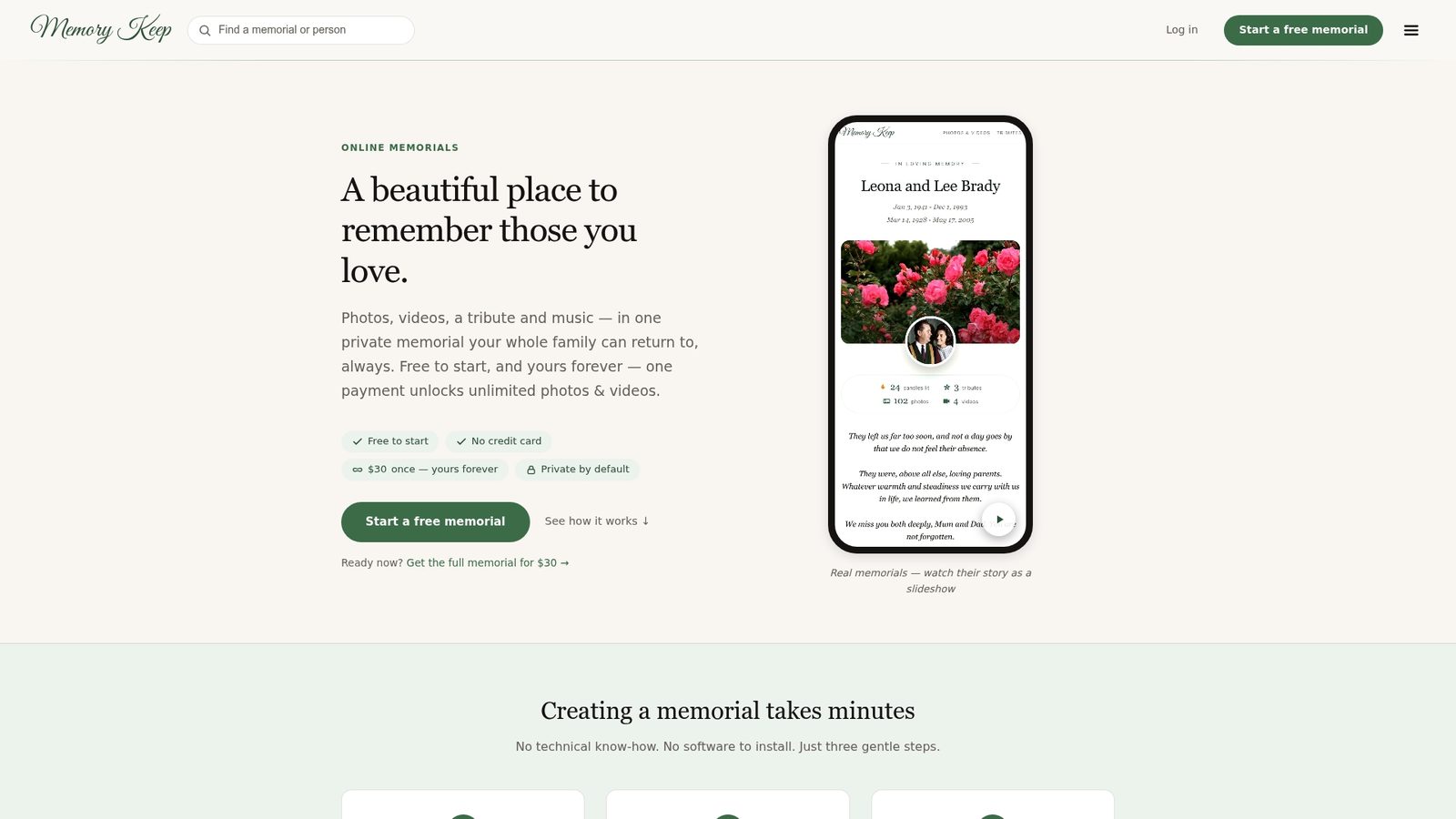
If you are still deciding, you can visit Memory Keep and explore at your own pace. There is no pressure and no clock. For a pet, our guide to creating a dog memorial page walks through the same steps with privacy in mind.
A short checklist before you post
- Is the memorial ready, or is it enough to share a first photo and add more later?
- Did you pick the right audience for the Facebook post?
- Have close relatives seen it first?
- Have you saved copies of the photos you care about most?
- Do you have a trusted person who can help moderate comments if needed?
You do not need to do everything at once. A single photo and a single sentence is a beautiful beginning.
FAQ
How do you turn your Facebook into a memorial page?
You cannot convert a profile into a separate page yourself, but you can ask Facebook to memorialize the account through its Help Center form. Once approved, Remembering appears beside the name and friends can share in Tributes. If you want a lasting space beyond Facebook, you can create a memorial page and share its link.
Can you still log into a memorialized Facebook account?
No. No one can log into a memorialized account, and a legacy contact cannot post as the person or read private messages, according to Empathy. A legacy contact can pin a post and update the profile and cover photos.
Is it a good idea to memorialize a Facebook account?
For many families it is. It keeps the profile visible, stops birthday reminders and ads, and protects against unauthorized access, per Meta’s memorialization policy. If it does not feel right, you can ask Facebook to delete the account instead.
What is an example of a short tribute message?
“Thank you for the way you loved us. We carry you with us every day.” Two sentences are plenty. You can add a favorite memory, a photo, or a link to a memorial page where others can add theirs.
Can I share a memorial page with people who are not on Facebook?
Yes. A memorial link works in a text, an email, or a printed QR code. Anyone with the link can visit and leave a message, whether or not they have a Facebook account.
Sources
- Memorialization | Transparency Center (Meta)
- Dealing with a loved one’s social media accounts | Empathy
- Facebook adds ‘Tributes’ section for remembering lost loved ones | TechRadar
- Facebook: How to create a legacy contact | Android Police
- How to memorialize, delete social media accounts | USA Today
- Beyond Casseroles: What Widowed Parents Actually Need | Helping Mom