
The fastest safe route depends on whose photo it is. For your own account, request Instagram’s official data export. For someone else’s public post, ask them for the original file first, and use a paste-URL downloader or a browser trick as backup. For Stories, screen record before they expire. Always keep captions and dates attached, and never skip asking permission when the photos aren’t yours.
TL;DR:
- Downloading photos from others’ Instagram accounts requires permission and should prioritize asking for the original files along with captions and dates.
- Using Instagram’s data export provides the highest quality for your own account but takes up to 30 days, making it unsuitable for immediate needs.
- Paste-URL downloaders and browser tricks deliver quick results for public posts or single images but may compromise quality or involve trust risks.
- Screen recording is the only reliable method to save Stories or highlights after they expire, though it may reduce image clarity.
- Organizing saved images with consistent naming, keeping original files intact, and recording permissions prevents loss and supports meaningful memorial presentations.
Table of Contents
- At-a-Glance Methods for Saving Instagram Photos for a Memorial
- Step-by-Step: How to Download Instagram Photos for Each Method
- Getting the Best Image Quality and Keeping the Story Intact
- Permission and Privacy: What You Owe the Person Who Posted It
- Organizing and Backing Up Photos for a Memorial Archive
- Choosing and Presenting Photos on a Memorial Page
- Why Provenance Matters More Than People Assume
- Sources
At-a-Glance Methods for Saving Instagram Photos for a Memorial
Before you touch a single download button, it helps to know which method fits your situation. Some options give you pristine, original files. Others are quick but come with trade-offs worth knowing upfront.
- Instagram’s data export — highest fidelity for your own account, but slow (up to 30 days) and requires login access.
- Asking the original poster — the gold standard for anyone else’s photos; you get the real file plus permission in one step.
- Paste-URL downloaders — fast for public posts, no login needed, but quality depends on the tool and some sites are untrustworthy.
- Browser tricks (view-source, dev tools) — free and reliable for grabbing a single high-resolution image without installing anything.
- Browser extensions or userscripts — best for bulk saves across many posts, with some risk if you install from an unverified source.
- Screenshots and screen recordings — the only option left once a Story or highlight has expired, though quality takes a hit.
Every one of these methods has a different answer to the same three questions: how good is the image quality, do you need to log in, and how much privacy risk are you taking on. A quick export from Instagram itself carries almost no risk but takes weeks. A browser trick is instant but only works one image at a time.
Whichever route you choose, hold onto the caption and the original post date. For a memorial, that context often matters as much as the picture itself, since captions frequently carry a loved one’s own words.
Step-by-Step: How to Download Instagram Photos for Each Method
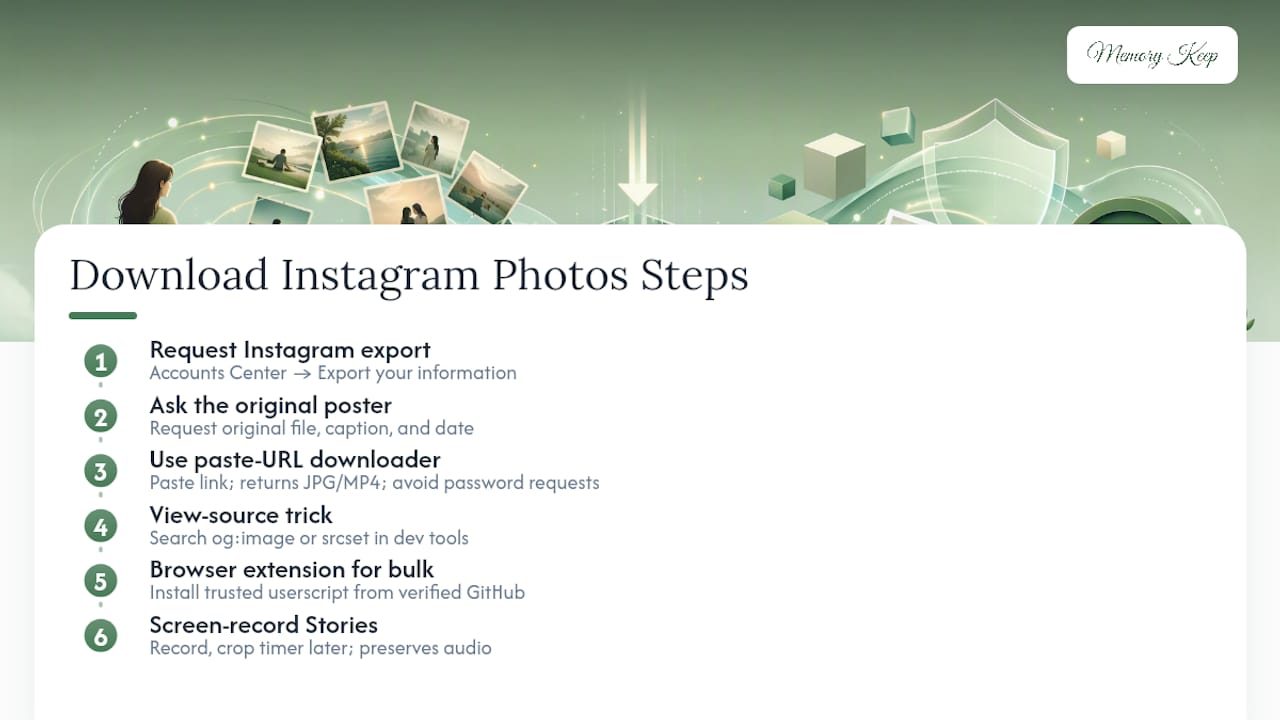
1. Request your official Instagram export. Go to Accounts Center, then “Your information and permissions,” then “Export your information.” Instagram states this export flow can take some time to process, and the download link is available for only a limited period once it’s ready, so check back and grab it promptly.
2. Ask the original poster for the file. Message them directly and request the original photo or video, not a screenshot. Ask for the caption text and the date it was posted too. A simple message works: “Would you mind sending me the original file from that post? I’m putting together a memorial and want the best quality version.”
3. Use a paste-URL downloader for public posts. Copy the post link from Instagram, paste it into a downloader tool, and it typically returns the image in its original JPG or MP4 format. Carousels often come back as a numbered ZIP file, preserving slide order for a slideshow. Skip any site that asks you to log in with your Instagram credentials.
4. Try the browser view-source trick for a single high-res image. Right-click the post in your browser and view the page source, or open developer tools and search the network panel for “og:image” or a srcset entry. This often reveals a higher-resolution version of the file Instagram serves in the feed.
5. Install a trusted browser extension for bulk downloads. For saving many photos at once, a well-reviewed userscript can add an in-page download button and select the highest available resolution automatically. Only install from a source you recognize, like a verified GitHub repository.
6. Screen record Stories and highlights before they vanish. Open the Story, start your phone’s built-in screen recording, and let it play through. Crop out the timer and UI later. For video Stories, this is also your only way to preserve the original audio.
Pro Tip: Test any new downloader tool on a photo you don’t need first. If it asks for your Instagram password, close the tab immediately and try a different method.
Getting the Best Image Quality and Keeping the Story Intact
Instagram compresses most feed images, so tracking down the original source matters more than people realize. Checking the og:image tag or a srcset URL in your browser’s dev tools often surfaces a cleaner file than what loads on screen. Paste-URL downloaders vary here too. Some pull the source format directly; others re-encode the file, which can soften detail you’ll notice once it’s printed or shown on a big screen.
Quality is only half the job. A photo without its caption or date loses something a family will want back.
- Copy the caption text and post date before you close the tab.
- Name each file consistently, like
username_postid_date.jpg, so nothing gets mixed up later. - Keep photos from the same person or event in one folder.
- Save your original download untouched, then make a separate copy for cropping or editing.
Downloader tools that package carousels into a numbered ZIP keep the slide order and original file format intact, which saves real time when you’re assembling a slideshow later.
Permission and Privacy: What You Owe the Person Who Posted It
A public Instagram account doesn’t mean every photo on it is free to reuse without asking. Before you download anyone else’s photo for a memorial, a short conversation goes a long way, and it usually gets you a better file in the process.
- Ask first, and request the original file rather than relying on a downloaded copy.
- Credit the poster on the memorial and get their okay before publishing, even for public posts.
- Never enter your Instagram username or password into a third-party download site. Services that request login credentials put your account at real risk and often violate Instagram’s own Terms of Use.
- Leave private accounts alone unless you have direct, explicit consent from the account owner or someone with rights to that content.
- Keep a simple record of who gave permission and when, in case a family member asks later.
This isn’t just etiquette. It’s the difference between a memorial that honors someone’s memory and one that quietly overstepped a boundary they can no longer speak up about.
Organizing and Backing Up Photos for a Memorial Archive
Once the photos are saved, a little structure now prevents heartbreak later, like a hard drive failure right before a service.
- Create a folder for each person or pet, with subfolders by year or event.
- Build a simple spreadsheet tracking the source, Instagram handle, post URL, date, and whether you have permission for each file.
- Store one copy locally and at least one copy in the cloud. Two points of failure are one too many for something irreplaceable.
- Add a short note or caption alongside each photo describing who’s in it or what it captures.
- Before uploading anywhere, check the accepted file formats and size limits so your best images aren’t rejected at the last step.
Pro Tip: Keep your original, untouched downloads in a separate “master” folder you never edit directly. Make cropped or resized copies for actual use, so you’re never one mistake away from losing the source file.
Choosing and Presenting Photos on a Memorial Page
Not every photo deserves equal weight on a memorial page. Mix a few polished portraits with the candid, imperfect shots that actually sound like the person, laughing mid-sentence or caught off guard at a family dinner. A slightly lower-resolution image with real personality often lands harder than a technically perfect one that feels staged.
Context is what turns a photo gallery into a tribute. Wherever you can, pair each image with its original caption, a short memory, or a note about who took it and when. Choosing photos with intention rather than uploading everything at once tends to produce a page people actually spend time on.
When you’re ready to build the page itself, Memory Keep’s features support unlimited photo and video uploads, so you’re not forced to choose between quality and quantity. Keep your master files stored safely before you make the resized copies you’ll actually upload, and consider Memory Keep’s help resources if you run into questions about file formats or slideshow setup. If you’re building this for a school community or group, group memory-preservation practices offer useful ideas for handling shared photo archives.
Why Provenance Matters More Than People Assume
Most guides on saving Instagram photos treat image quality as the whole story. It isn’t. In our experience helping families build memorials, the caption and the date attached to a photo often carry more weight than the pixel count. A slightly soft image with the person’s own words underneath it beats a razor-sharp photo with no context every time.
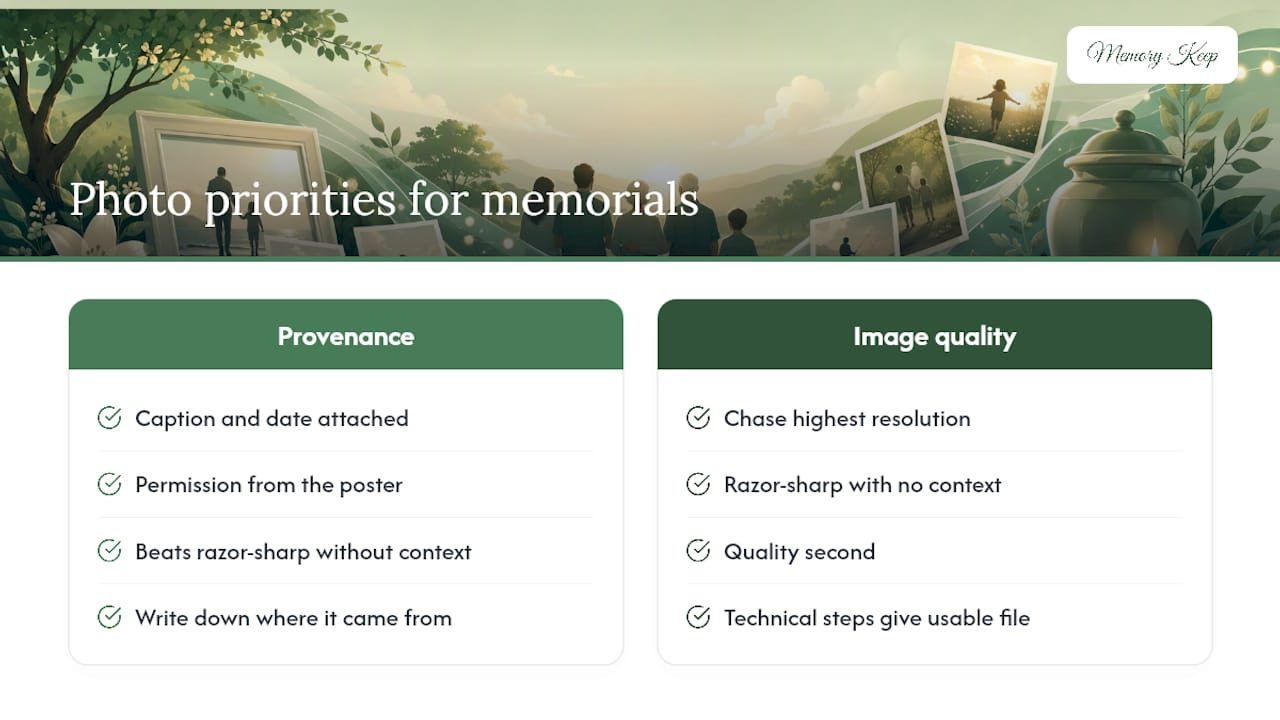
The conventional advice, chase the highest resolution and stop there, misses the point of why people are downloading these photos in the first place. Nobody builds a memorial to win a photography contest. They build it to remember a voice, a joke, a specific afternoon.
Prioritize permission and provenance first, quality second. Ask the person who posted it before you download anything. Write down where each photo came from while you still remember. Keep the caption. The technical steps in this guide will get you a usable file. What makes that file worth keeping is everything you preserve alongside it.
— Memory Keep