
A pet memorial page is a dedicated online tribute where you can share photos, stories, and keepsakes to honor an animal you loved. You can create one right now, in under 30 minutes, using a free community site or a freemium memorial platform like Memory Keep.
Most platforms let you start for free and only charge if you want unlimited photos, videos, or permanent storage. Memory Keep, for example, uses a freemium model with a one-time $30 upgrade per memorial rather than a subscription. Organizations like Best Friends Animal Society and publications like Pet Hospice Journal are useful trust anchors here. They show that pet memorialization is a recognized, well-supported practice, not a niche afterthought.
If you want to move fast, here are your three quickest paths:
- Free community site or social page: basic profile, a handful of photos, public visibility, no cost.
- Freemium memorial platform: more storage and layout options for free, with paid tiers for unlimited media.
- Memory Keep paid upgrade: one-time $30 fee per memorial that unlocks unlimited photos, video, keepsakes, and permanence features.
Key Takeaways
A meaningful pet memorial page needs only a name, a handful of strong photos, key dates, and a short honest tribute to be worth sharing.
| Point | Details |
|---|---|
| Start with the essentials | Name, 3 to 8 photos, key dates, and a short tribute cover the core of any meaningful page. |
| Fastest creation path | A freemium platform or Memory Keep can produce a publishable page in about 30 minutes. |
| Set privacy deliberately | Decide who can view, comment, and download before you share the link widely. |
| Verify any charity first | Check Charity Navigator, Candid, or GreatNonprofits before adding a donation link. |
| Memory Keep option | Offers a one-time $30 upgrade per memorial for unlimited media, keepsakes, and QR code support. |
Table of Contents
- What to Include on a Pet Memorial Page
- How Do You Create a Pet Memorial Page Step by Step?
- Free vs. Paid Pet Memorial Pages: What Changes?
- Sharing, Privacy, and Permanence: Getting the Details Right
- Creative Ideas and Sample Messages for a Pet Memorial
- Adding a Donation Option and Verifying the Charity First
- Where to Find Grief Support After Losing a Pet
- An Honest Note on Making Time for a Memorial
- A Practical Option: Memory Keep for Pet Memorial Pages
- Sources
What to Include on a Pet Memorial Page
A memorial page works best when it feels specific to your pet, not generic. Start with the essentials, then layer in extras as time allows.
The non-negotiables are simple: your pet’s name, a few strong photos, birth or adoption date and date of death, a short tribute in your own words, and a way for others to reach or contribute to the page. Everything else is a bonus that deepens the tribute without complicating it.
Once the basics are set, consider these enrichments:
- A short video clip or voice memo, if you have one saved.
- A simple map marking a favorite park, vet visit milestone, or the place you first met.
- An open comment section where visitors can leave their own memories.
- Collaborative uploads so siblings, grandkids, or close friends can add their own photos.
- A downloadable keepsake, like a printed photo book or slideshow video.
Before you publish, decide who can post and whether the page is public or private. Some families want an open tribute the whole neighborhood can see; others want a quiet, invite-only space for close family. Either choice is valid, but you should make it deliberately rather than by default. Ask any platform how it handles long-term storage, since a memorial only matters if it is still there in ten years.
Pro Tip: Choose 3 to 8 photos that actually capture your pet’s personality, not just the most flattering ones. A blurry photo of your dog mid-zoomies often means more than a perfectly posed portrait. Keep image files under a few megabytes each so uploads do not stall.
How Do You Create a Pet Memorial Page Step by Step?
You do not need design skills or a free afternoon to put together something meaningful. Here is a fast, low-friction path from blank page to published tribute.
- Choose your platform. Pick a free community site if you want something quick and casual, a freemium platform if you want more layout control, or Memory Keep if you want unlimited media and permanence built in from the start.
- Gather your media and pick a layout. Pull your best 3 to 8 photos and any video or audio clips into one folder before you start uploading.
- Write a short tribute. Aim for three sentences: who your pet was, a specific memory that captures them, and what you miss most. A simple starter: “[Name] was my [dog/cat/companion] for [X] years. [Specific memory or habit]. I will always miss [specific thing].”
- Configure privacy and sharing. Decide who can view and comment, add a donation link if you want one, and generate your shareable URL or QR code.
- Publish and share. Send the link by email or text to close family first, then share more broadly on social media, or print the QR code onto a marker or keepsake box.
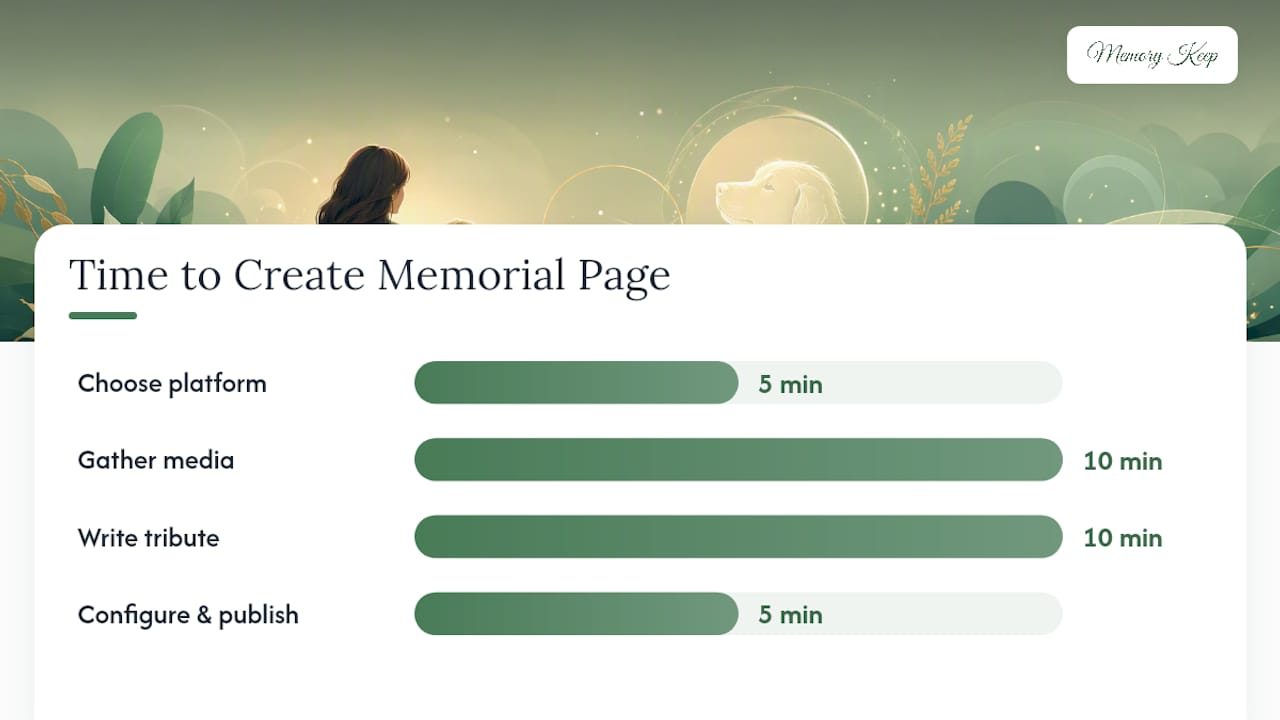
Realistically, choosing a platform takes five minutes, gathering media takes ten, writing the tribute takes another ten, and configuring privacy and publishing takes five more. That is a complete memorial page in about 30 minutes, and the research on engagement suggests pages with 3 to 8 curated photos and a short 2 to 4 sentence tribute tend to draw the most visitor engagement.
Pro Tip: Draft your tribute text in a notes app before you open the memorial platform. Grief makes it hard to write cleanly in the moment, and having the words ready first means you are just uploading, not composing, under pressure.
Free vs. Paid Pet Memorial Pages: What Changes?
Free community pages, including group-run spaces like the Forever Friends Pet Memorial Page on Facebook, typically offer a basic profile, a handful of photo uploads, and public listing among other memorials. That is often enough for a simple tribute, but it comes with real limits: fewer customization options, capped storage, and less control over who sees the page.
Freemium and paid platforms usually add unlimited media storage, downloadable keepsakes like photo books or slideshow videos, QR code generation for headstones, and stronger privacy controls. Memory Keep’s model reflects that structure directly: the free tier lets you build a basic page, and a one-time $30 upgrade per memorial unlocks unlimited photos and video, keepsake downloads, and permanence features, according to Memory Keep’s feature page. There is no recurring subscription to track or cancel.
Here is how the tradeoffs typically break down:
- Free community sites: no cost, quick setup, but limited uploads and less privacy control.
- Freemium platforms generally: low barrier to entry, but often gate the features families care about most (unlimited media, keepsakes) behind a paywall.
- One-time upgrade platforms like Memory Keep: a single $30 payment instead of a monthly fee, which suits a memorial you intend to keep for years rather than months.
Sharing, Privacy, and Permanence: Getting the Details Right
A memorial page should be as easy to share as it is to protect. Most platforms give you a public link anyone can find, a private link you control, invite-only access for collaborators, or direct social sharing. Pick based on how wide you want the circle of mourners to be.
Before you share the link with anyone, walk through a short privacy checklist:
- Decide who can leave comments versus who can only view.
- Check whether visitors can download original photos or only view them.
- Confirm the platform offers an export option, so your content is not trapped if you ever want to move it.
- Ask directly about long-term storage policy rather than assuming permanence.
Permanence is worth pressing on. A comparison of memorial platforms found that checking a provider’s export options and storage policy before uploading irreplaceable media prevents a lot of future heartbreak. Ask the same question you would ask before signing any long-term contract: what happens to this if the company changes hands or shuts down?
QR codes solve a specific, physical problem: connecting a headstone, urn, or keepsake box to a living online tribute. A visitor scans the code with a phone camera and lands directly on the memorial page, no typing required. Placing the code on a small weatherproof marker or an engraved plate keeps it durable through seasons outdoors, and Memory Keep’s QR guide covers exactly how to size and print one correctly.
Pro Tip: If you order a QR marker for an outdoor memorial, laminate or seal it against weather before placing it. A code that has faded or peeled cannot be scanned, and you lose the whole point of linking a physical marker to a digital tribute.
Creative Ideas and Sample Messages for a Pet Memorial
Sometimes the hardest part is not the setup. It is knowing what to actually write or post. A few structural ideas can make the page feel richer without adding much extra work.
- Build a photo timeline from puppyhood or kittenhood through their senior years.
- Post a weekly spotlight memory for the first month after the loss, rather than everything at once.
- Create a short tribute playlist of songs that remind you of your pet.
- Add a memory map marking favorite walking routes, vet visits, or vacation spots.
- Compile a downloadable slideshow keepsake for family who cannot visit the page online.
When it comes to the words themselves, match the tone and length to where the message will appear. A banner needs something short; a guestbook comment can run longer.
For a heartfelt banner caption, something short works best: “Forever my good boy.” For a longer tribute message, try expanding on a specific memory: “You greeted every single day like it was the best one yet, and somehow that made it true for the rest of us too.” For children writing their first message, keep it simple and direct: “I love you and I miss you every day.” Browsing a fuller collection of memorial quotes can help you find phrasing that matches your own voice.
Adding a Donation Option and Verifying the Charity First
Many families want their pet’s memorial to do some good in the world, and adding a “donate in memory” link is a common way to do that. Most memorial platforms let you either link out to a charity’s donation page directly or add suggested text asking visitors to give in your pet’s name.
Before you add any charity link, verify the organization is legitimate and financially sound. A quick verification pass takes just a few minutes:
- Look up the organization’s EIN and check its rating on Charity Navigator, which rates groups like Best Friends Animal Society on financial health and transparency.
- Check its nonprofit profile on Candid (GuideStar) for mission details and financial filings.
- Read community feedback on GreatNonprofits to see how donors describe their experience.
- Confirm whether your memorial platform simply links out to the charity’s own donation page, or whether it collects and forwards funds itself. That distinction affects who is responsible for your money once you click “donate.”
Organizations like Best Friends Animal Society even offer dedicated pages built specifically for memorializing a pet through a donation, which can be a meaningful alternative to a generic “in memory of” link.
Where to Find Grief Support After Losing a Pet
The loss of a pet is not a smaller grief than any other. It is a real one, and it deserves real support. Building a memorial page can be part of that healing process, giving you somewhere to return when you want to feel close to your pet again.
If you want structured reading, Pet Hospice Journal publishes articles specifically on pet loss and coping strategies. Memory Keep’s own grief resources guide and broader support directory round out a short but solid reading list.
In the immediate aftermath, small actions help more than big gestures. Talk about your pet out loud instead of avoiding the subject. Let yourself post to the memorial page even if it is just one line some days. Give children a way to grieve too, whether that is drawing a picture for the page or writing a short message themselves.
Pro Tip: Peer support groups tend to help most in the early weeks, when you need people who simply understand the specific ache of losing an animal. Consider professional counseling instead when grief starts interfering with sleep, work, or daily functioning for more than a few weeks. Local veterinary clinics often keep referral lists for pet loss counselors.
An Honest Note on Making Time for a Memorial
Grief has a way of making even simple tasks feel enormous, and building “the perfect memorial” can turn into another burden instead of a comfort. That expectation is misplaced. A memorial page does not need to be complete, polished, or exhaustive to matter. Three photos and two honest sentences will do more good sitting online tonight than a beautifully designed tribute you keep postponing for another week.
The smallest meaningful version of this project is still a real one. Upload the photos you already have on your phone. Write the first thing that comes to mind about your pet, even if it feels too plain. You can always add more later, and most platforms, including the writing prompts and grief resources built into memorial tools, exist specifically to help you get past that first blank page.
What matters is that the page exists, gets shared with the people who loved your pet too, and stays there for you to visit whenever you need it.
A Practical Option: Memory Keep for Pet Memorial Pages
If you want a memorial page built specifically with pets in mind, Memory Keep covers the checklist this article just walked through: unique shareable links, QR code support for headstones or keepsakes, collaborative uploads so family can add their own photos, and downloadable keepsakes like photo books and slideshow videos.

The model is freemium with a one-time $30 upgrade per memorial, not a subscription. That single payment unlocks unlimited photos and video, downloadable keepsakes, and long-term storage, so you are not stuck paying monthly to keep a memorial online. You can see what a finished page looks like by browsing a real example, like In Memory of Dixie, which shows the photo layout, tribute text, and visitor messages in action.
Getting started takes three basic steps: pick a template built for pets, upload your photos and write a short tribute, then configure sharing and publish. Most families have a live page ready to share within about 30 minutes. If you are ready to build one for your own pet, start your pet memorial page and have something to share with family today.
Sources
For readers who want to go deeper on any part of this process, these sources cover the specific gaps in this guide: