

Yes, you can preserve a deceased person’s text messages for an online memorial. The single best approach is to export the conversation as a PDF or a well-organized set of images, then upload those files to a memorial page where family and friends can read them together. PDF exports are ideal because they keep timestamps, sender names, and the natural flow of the conversation intact, and they include any photos shared in the thread. Digital legacy planning that accounts for messages and attachments, not just social profiles, is what makes those memories retrievable years from now.
Pro Tip: Before you do anything else, make a full local backup of the device or account. This untouched copy is your safety net. Never delete or alter the original thread while you work.
Key Takeaways
Preserving a deceased loved one’s text messages for a memorial works best when you secure the device first, export conversations as PDFs, curate with care, and store copies in at least three places.
| Point | Details |
|---|---|
| Secure the device first | Make a full local backup within 48 hours before any account or sync changes occur. |
| Choose PDF as your primary format | PDF exports preserve timestamps, sender names, and attachments in a readable, uploadable file. |
| Curate and redact before sharing | Include milestones and everyday voice; blur third-party details and log consent from anyone in the thread. |
| Use a three-layer backup | Keep a local copy, an encrypted cloud copy, and an archival PDF/A for long-term safety. |
| Upload to Memory Keep | A free memorial page accepts PDFs and images; a one-time $15 upgrade unlocks unlimited storage and keepsake downloads. |
Table of Contents
-
How to preserve conversation context, attachments, and timestamps
-
Legal considerations for accessing a deceased person’s messages
What to do right now: your 48-hour checklist
When grief arrives without warning, it helps to have a short list of concrete steps. Work through these within the first 48 hours while the device is still accessible.
-
Keep the device powered and connected to its charger. A dead battery can complicate access.
-
Make a full local backup immediately (iTunes/Finder for iPhone; Google One or a USB transfer for Android).
-
Identify the specific conversations you want to preserve and note the contact names.
-
Export or screenshot those threads before any automatic cloud sync or account changes occur.
-
Save all attachments (photos, videos, voice notes) from the target conversations into a named folder.
-
Coordinate with the executor or a trusted family member so only one person handles the device at a time.
You do not need a death certificate to capture messages already on a device you have lawful access to. That document becomes relevant only if you need to contact a carrier or platform for account access, which this guide does not cover.
Pro Tip: Never “clean up” a thread or delete anything while preserving. Even accidental deletions can remove timestamps and context that matter deeply later.
As digital legacy research makes clear, messages and attachments carry high emotional value yet are often excluded from platform legacy tools, which makes your own local copy the most reliable protection you have.
Three practical ways to capture text-message threads
Choose the method that fits the length of the conversation and the device you are working with.
Method A: Export to PDF
Export the conversation from a local backup using desktop software, then format it as a PDF. This produces a clean, readable file that preserves the chat-bubble layout, timestamps, and embedded photos. Families often prefer PDF exports because they are easy to print, share, and upload to a memorial platform.
Best for: Long conversations, printing keepsakes, uploading to a memorial. File format: PDF (PDF/A for archival copies). iPhone note: Export from an iTunes or Finder backup using a third-party desktop tool that reads iPhone backups. Android note: Some messaging apps (Google Messages, Samsung Messages) have a built-in export or backup option that produces a readable file.
Method B: Screenshots or stitched images
Scroll through the thread and take screenshots, then stitch them into a single long image or organize them as a numbered sequence. This is the fastest method and requires no extra software.
Best for: Short threads, specific exchanges, quick capture when time is short. File format: PNG or JPG, numbered sequentially (e.g., thread_001.png, thread_002.png). Cons: Screenshots can miss messages if you scroll too fast, and they require manual stitching for readability.
Method C: Copy/paste transcript or raw text export
Select all text in a conversation and paste it into a plain-text or word-processing document, or use an app’s built-in export to produce a TXT or CSV file.
Best for: Searchable archives, compact storage, accessibility tools. File format: TXT or CSV. Cons: Loses visual formatting and does not automatically include image attachments.
| Method | Best use | File format | Preserves images? |
|---|---|---|---|
| PDF export | Long threads, printing, memorial upload | PDF / PDF/A | Yes, when exported from backup |
| Screenshots | Short threads, quick capture | PNG / JPG | Yes (visible in frame) |
| Text transcript | Searchable archive, compact copy | TXT / CSV | No (links only) |
Pro Tip: Use Method A as your primary archive and Method B as a quick visual backup. Having both means you can upload the PDF to a memorial and still share individual screenshots with family by text or email.
How to preserve conversation context, attachments, and timestamps
A message without its date and sender name loses much of its meaning. These are the metadata fields worth keeping.
-
Sender and recipient names (not just phone numbers)
-
Timestamps down to the date, and ideally the time
-
Message order (chronological, unedited)
-
Delivery and read receipts, if visible in the export
-
Reactions and emoji responses, where the platform captures them
For attachments, save each photo, video, GIF, or voice note as a separate named file and link it to the message it came from. Keeping original media alongside derivative copies is the best practice for long-term preservation. The native file is always the highest-quality source.
A consistent file-naming scheme prevents confusion later. Use this pattern:
YYYY-MM-DD_ContactName_thread_NNN.ext
Example: 2023-06-12_JohnDoe_thread_001.pdf
| Metadata field | Why it matters | How to preserve it |
|---|---|---|
| Sender name | Identifies whose voice you are reading | Include in export or add manually to caption |
| Timestamp | Anchors memory to a real moment | Use PDF export; avoid plain copy/paste |
| Attachments | Photos and videos are part of the story | Save separately with matching filename |
| Message order | Preserves the natural flow of conversation | Never reorder; export chronologically |
What to include, what to redact, and how to ask permission
Not every message belongs on a public memorial. Curation is an act of care, both for the person you are honoring and for others who appear in the thread.
Include:
-
Milestone moments (birthdays, celebrations, travel)
-
Everyday exchanges that capture their voice and humor
-
Messages of love, encouragement, or wisdom
Exclude or redact:
-
Highly personal health or financial details
-
Messages involving third parties who have not consented
-
Anything the deceased would likely have kept private
To redact: blur or crop phone numbers, account references, and any identifying detail about a third party before uploading. Keep the unedited original in a private, password-protected folder separate from the public version.
Asking permission: a short email template
Subject: Sharing [Name]'s messages on their memorial
Hi [Name],
We are creating an online memorial for [Loved One] and would like to include some of their text conversations. Before we share anything publicly, we want to make sure everyone is comfortable. Could you let us know if you are okay with messages from your thread being included? We will redact any personal details and share a preview before anything goes live.
Please reply to this email with a simple “yes” or “no,” or let us know if you have any questions. We will keep a record of your response.
With love, [Your Name]
Pro Tip: Log consent in a simple spreadsheet: one row per person, with columns for name, date of response, and what they approved. This takes five minutes and protects everyone.
How to organize and upload your files to a memorial
Preparation before upload makes the memorial feel intentional rather than rushed.
-
Create a folder structure on your computer. Organize by conversation partner or by theme (e.g.,
Memorial_JohnDoe/Conversations/Mom_thread/orMemorial_JohnDoe/Themes/Road_Trip_2022/). -
Name every file using the date-based convention above so files sort chronologically.
-
Sign in to Memory Keep and open the memorial you have created (or start a new one at Memorykeep).
-
Go to the uploads area. Memory Keep accepts photos, videos, and documents. Upload your PDF exports or image sequences there.
-
Set privacy. Choose public (visible to all visitors), private (visible only to you), or guest access (visible to people with the memorial link). For sensitive threads, start with guest access and widen it only after family review.
-
Add captions. A short caption turns a raw file into a memory. See the examples in the templates section below.
-
Enable collaborative uploads so other family members can add their own saved threads directly to the memorial.
Memory Keep’s digital legacy planning guide walks through creating an inventory of digital assets and designating who manages them, which pairs well with the upload workflow above.
Pro Tip: Upload a low-resolution preview image of the PDF as a thumbnail so visitors can see what the file contains before they open it.
-
Caption example: “June road trip texts — their humor comes through in every line.”
-
Caption example: “Mom’s last birthday message to Dad, July 2023.”
-
Caption example: “The group chat from Thanksgiving — chaotic and perfect.”
Backups, printing keepsakes, and long-term preservation
A three-layer backup approach keeps these memories safe for decades.
-
Local copy: Save everything to an external hard drive stored at home. Label it clearly and update it whenever you add new files.
-
Cloud copy: Upload an encrypted copy to a service like iCloud, Google Drive, or Backblaze. Use a strong, unique password and enable two-factor authentication.
-
Archival PDF: Convert your primary export to PDF/A format, which is designed for long-term readability without software dependencies.
For printing, PDF/A files translate cleanly to print shops. Keep original images and videos in JPEG/PNG and MP4 formats, which remain widely supported and easy to migrate. A bound memorial book that includes the chat-bubble layout, photos, and dates gives family members something physical to hold and share at a service or reunion.
| Storage layer | Format | Where to keep it |
|---|---|---|
| Local copy | PDF/A, JPEG, MP4 | External hard drive, labeled |
| Cloud backup | PDF/A, JPEG, MP4 | iCloud, Google Drive, or Backblaze (encrypted) |
| Print keepsake | PDF/A | Print shop or home printer, bound |
Templates, caption examples, and consent logging
Permission email: Use the template in the curation section above. Attach a one-page summary of what you plan to share so the recipient can give informed consent.
Caption examples you can copy and adapt:
-
“Their texts from our last road trip together — every joke still lands.”
-
“A quiet Tuesday morning exchange, March 2022. This is how they started every day.”
-
“The voice note they sent after the diagnosis. Brave and funny, as always.”
Consent log format:
-
Open a spreadsheet or plain document.
-
Add columns: Name, Relationship, Date Contacted, Response (Yes/No/Pending), Notes.
-
Save a dated copy each time you update it.
-
Store the log in the same folder as your unedited archive.
Pro Tip: Screenshot or forward the reply email and save it in the consent folder. A written record protects you and honors the trust people place in you.
Legal considerations for accessing a deceased person’s messages
Messages already stored on a device you have lawful access to, such as a phone handed to you by the family, can generally be copied and preserved without legal complications. The executor of the estate typically has authority to manage the deceased’s digital property, though the scope varies by state.
Federal law, specifically the Stored Communications Act, can limit what third parties, including family members, may access from carrier servers or cloud accounts without explicit authorization. This is why local device backups matter so much. What is already on the device is far more accessible than what must be retrieved from a platform or carrier.
If the deceased left a will or a digital legacy directive naming an executor, that person is the right point of contact for any account-level decisions. Some states have adopted versions of the Revised Uniform Fiduciary Access to Digital Assets Act (RUFADAA), which gives executors clearer authority over digital accounts. Consulting an estate attorney is advisable when account access is in question.
This section is general information, not legal advice. Confirm current rules with a qualified estate attorney for your specific situation.
How to keep sensitive messages secure while you work
Personal messages deserve the same care as financial documents. A few straightforward practices protect everyone involved.
Work on a personal computer, not a shared or public device. When transferring files, use an encrypted USB drive or a secure cloud folder rather than an unencrypted email attachment. Password-protect any folder containing unredacted message exports, and use a password manager to store that credential safely.
If you are uploading to a memorial platform, confirm that the platform uses HTTPS and that your account has two-factor authentication enabled. Delete working copies from shared drives once the final upload is complete, and keep only the archival copies in your three-layer backup.
What to do when a device or account is locked
If the device is locked and you do not know the passcode, your options depend on the platform. Apple’s Digital Legacy program allows a designated Legacy Contact to request access to an iCloud account using a Legacy Contact access key and a death certificate. Google’s Inactive Account Manager serves a similar function for Google accounts.
Without prior designation, family members may submit a next-of-kin request directly to Apple or Google. Both companies review these on a case-by-case basis and may require legal documentation. The process can take weeks, so acting early matters.
For Android devices without a Google account backup, a local unlock may require professional assistance. Avoid third-party “unlock” services that are not affiliated with the device manufacturer, as they carry security and data-integrity risks.
Why everyday messages are worth preserving
We believe the most meaningful parts of a person’s digital life are often the quietest ones. Not the public posts or the formal announcements, but the Tuesday morning check-ins, the inside jokes, the voice notes sent from a parking lot. Those are the messages that carry someone’s actual voice.
Grief is hard enough without losing those small, irreplaceable moments to a locked account or an accidental deletion. Memory Keep was built to give families a permanent, dignified place to gather everything that mattered, including the conversations that never made it onto a social feed. Grief support resources and practical guidance are part of what we offer, because preserving memories and processing loss often happen at the same time.
Memory Keep gives your saved messages a permanent home
Uploading a saved thread to a Memory Keep memorial takes the work you have already done and turns it into something the whole family can visit, contribute to, and carry forward. You can upload PDFs, images, and documents directly to a memorial page, add captions and dates, and set privacy controls so only the people you choose can see sensitive conversations. Family members anywhere in the world can add their own saved threads collaboratively, building a richer picture of the person you loved.
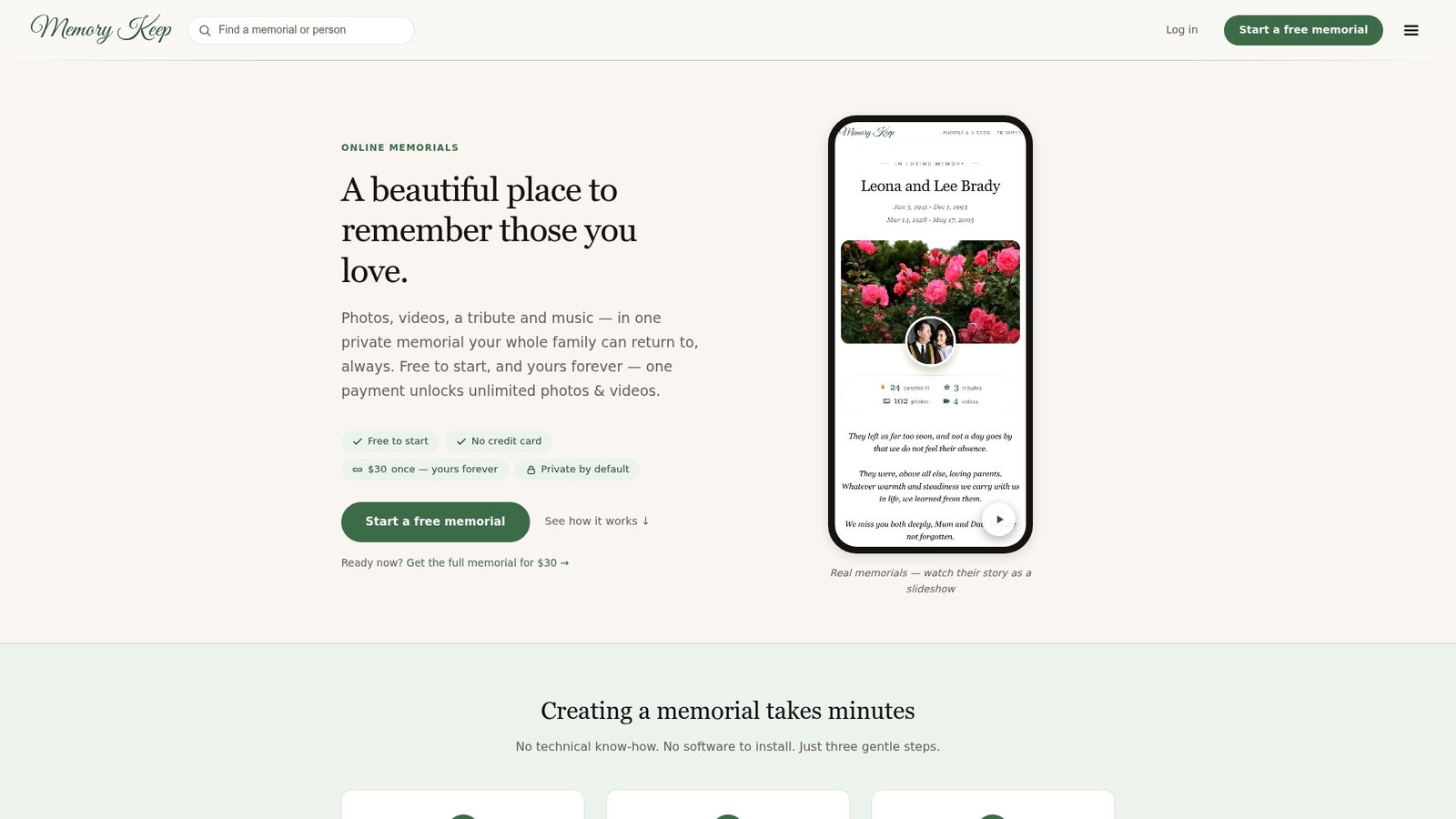
Memory Keep runs on a freemium model. A free memorial gives you a shareable link and limited uploads to get started. A one-time $15 upgrade per memorial unlocks unlimited photos, videos, and documents, plus downloadable keepsake slideshows and photo books. You can see how a finished memorial looks and explore all features before committing. When you are ready, start a free memorial and upload your first saved conversation today.
Sources
These sources informed this guide and offer deeper reading on preservation, digital legacies, and memorial creation.
-
Digital legacies are increasingly complex and require planning
-
The Best Advice on Preserving, Storing, and Digitizing Family Memories | Reviews by Wirecutter
This guide covers memorial-focused message preservation only. It does not address carrier-level or forensic account retrieval, which involves separate legal and technical processes.