
Funeral Slideshow Mistakes and How to Avoid Them
Most funeral slideshow mistakes come from the same place: you are making something deeply personal in a few exhausting days, often at night, with a deadline set by someone else. The most common errors are using popular songs without the right permission, choosing photos that hurt someone in the family, running too long or too fast, and bringing a file that will not play on the funeral home’s equipment. All of them can be avoided, and none of them mean you cared any less. This guide walks through each one gently, so you can spend your energy on the photographs and the person they show.
TL;DR
- Pick the music first for meaning, then check who is allowed to play it. A personal streaming subscription does not cover a public service.
- Ask before you crop, restore, caption or remove anyone from a photo. Close family should see any change before the day.
- Plan roughly 4 to 6 seconds per photo and keep the whole slideshow short enough that it supports the service rather than taking it over.
- Export a widely compatible file (MP4, 16:9, 1080p), test it on the real equipment, and carry a backup.
- Keep a living copy of the photos in one shared place, so the slideshow is a moment in the service and not the only home for the memories.
Table of Contents
- Why slideshow mistakes feel so heavy
- Mistake 1: Using popular music without the right permission
- Mistake 2: Choosing a soundtrack that competes with the photos
- Mistake 3: Using photos without asking, or changing them without asking
- Mistake 4: Letting the slideshow run too long, or too fast
- Mistake 5: Captions nobody can read
- Mistake 6: Bringing a file that will not play
- Mistake 7: Letting the slideshow be the only home for the memories
- Collecting everything in one place
- How Memory Keep fits in
- A checklist for the day before
- FAQ
- Sources
Why slideshow mistakes feel so heavy
Grief arrives without warning, and it rarely leaves room for careful project work. You may be gathering photographs from three siblings, an aunt who still keeps prints in a shoebox, and a cousin’s phone. Someone wants a particular song. Someone else is worried about a photo with a former spouse in it.
A slideshow is also played once, in a room full of people who loved the same person. There is no second take. That is why a little planning is worth it. The mistakes below are not signs of carelessness. They are the predictable ones, and knowing them in advance lets you step around them.
Mistake 1: Using popular music without the right permission
The song your mother loved may be the one that belongs in the slideshow. The trouble is that playing music in public and attaching music to a video are two different rights.
A funeral home that plays recorded music at services generally needs a performance license. One funeral industry guide reports that the National Funeral Directors Association negotiates a blanket license covering ASCAP, BMI and SESAC, the main groups that license the large majority of copyrighted songs. Putting a popular recording behind photographs and saving it as a video goes a step further. That is called synchronization, and it requires permission from the song’s rightsholder, which a performance license does not provide. It is also why a livestream of a service can go silent the moment a slideshow begins.
Two more points to keep in mind:
- A personal Spotify, Pandora or Amazon Music subscription covers private listening only, not playing songs at a public gathering.
- The law behind this is real, though enforcement against a family at a memorial is not something to dread. U.S. copyright law allows statutory damages of $750 to $30,000 per work for infringement, and more when it is willful. Most families will never face this, but a platform takedown or a muted stream is a much more likely and more painful surprise.
If you want to understand the two kinds of rights in plain terms, this explanation of public performance and synchronization rights is a clear starting point.
What to do instead
Ask the funeral home whether they hold a blanket music license and how they prefer to handle music. Then choose one of three routes: play the favorite song live in the room, use royalty-cleared or original music under the slideshow, or choose gentle instrumentals. Our own guide to funeral slideshow songs lists options by feeling, which can help when you cannot find the right words for what you want the room to feel.

On Memory Keep, music comes from a curated library organized by feeling, so you can look for “peaceful” or “hopeful” rather than scrolling through titles while you are tired.
Mistake 2: Choosing a soundtrack that competes with the photos
Even when the rights are settled, the song can still be wrong. The music should support the story and never compete with it. A fast chorus over photos of a quiet life, or lyrics that people strain to follow, pulls attention away from the faces.
A simple way to choose:
- Begin with songs your loved one actually enjoyed.
- Listen to the first thirty seconds with the first photos on screen. Does the mood match?
- If you are unsure, choose a gentle instrumental or a lyrical piece that is not too busy.
- Avoid a song that will make one family member leave the room because of a painful memory attached to it. Ask someone close if you are not sure.
For a pet’s memorial, the same rule holds. A tune that suits the way the animal lived, playful or calm, will serve better than something grand.
Mistake 3: Using photos without asking, or changing them without asking
This is the mistake that causes the most quiet hurt, and it is the one that takes the least time to prevent.
Photos with other people in them
The best photograph of your father may include his first wife, an estranged brother, or a friend who is no longer in the family’s life. Decide with the people closest to the loss whether the photo stays. If you want to crop someone out, ask first. A crop that removes another person or changes what the picture means is a decision for the family, not only for whoever happens to be building the slideshow. Our page on who can say yes to a memorial photo explains how to think about that conversation.
Restoring and editing
Old, faded or blurry photos tempt us to fix them. Be careful with automatic face restoration or tools that fill in missing detail. They can invent features and make a beloved face look slightly like a stranger’s. Keep these habits:
- Always keep the original file untouched and work on a copy.
- Show the family the actual edited result before it goes in, not a description of it.
- Treat rotating a sideways photo and heavily altering a face as very different decisions. The more you change, the more important it is to ask.
A technically clean image is not always the one the family wants. A slightly grainy snapshot in which she is laughing may mean more than a polished portrait.
Photos you do not own
Family snapshots are yours to use. Professional portraits, wedding photographer proofs and press photographs belong to the photographer or agency, and images pulled from the internet should be treated as copyrighted unless they are clearly public domain or licensed for reuse. For a private service this rarely becomes an issue, but it matters if you plan to share the slideshow widely online. When in doubt, choose the photographs your family took.
If the slideshow will also be shared online, it is kind to think about what your loved one would have wanted. Did they value privacy? Talk with the people closest to them before posting, and begin with consent and context.
Mistake 4: Letting the slideshow run too long, or too fast
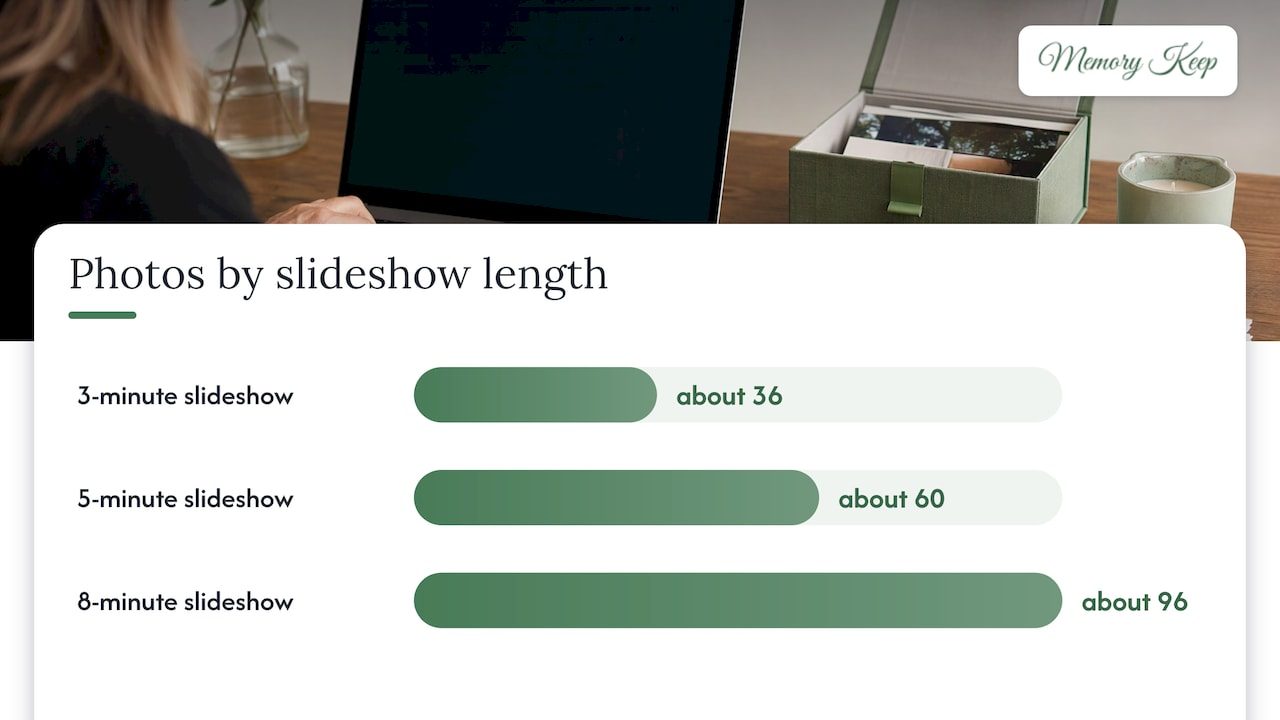
There is no single correct number of photos. What matters is how the slideshow feels in the room. A useful rule of thumb is about 4 to 6 seconds per photo, with 7 to 8 seconds for group shots, and short video clips of 10 to 30 seconds so they add texture without taking over.
Here is what that looks like in practice:
| Slideshow length | Photos at about 5 seconds each | Good for |
|---|---|---|
| 3 minutes | about 36 | One song, played during the service |
| 5 minutes | about 60 | A fuller life story with a few video clips |
| 8 minutes | about 96 | A reception or visitation, playing on a loop |
Those figures are our own arithmetic from the pacing guidance above, so treat them as a starting point. If the slideshow will play during the service itself, ask the funeral home or officiant how many minutes they have. If it will loop quietly at the visitation, it can run longer, because people drift in and out.
A few pacing mistakes to watch for:
- Too many photos from one era. Spread them across childhood, work, family, friendships and the last years.
- Duplicates. When photos arrive by several email threads and text messages, the same picture ends up in twice. Gather everything in one place.
- Transitions that call attention to themselves. Spinning, flying or bouncing effects are rarely right for a memorial. Simple fades let the faces speak.
Our article on memorial slideshow ideas has suggestions for organizing the story, and our step-by-step guide to making a memorial slideshow covers the whole process from start to finish.
Mistake 5: Captions nobody can read
A slideshow at a funeral is often projected onto a screen in a room where some guests sit far back. Decorative script fonts, small type and low contrast all disappear at that distance. Use a large, plain, high-contrast font. A name, a year and a place are usually enough.
Captions also carry emotion. Before you write one, ask whether it adds something the photograph cannot say on its own, such as “Lake Erie, 1987, the summer he taught us all to fish.” If it only repeats what everyone can see, leave it out. If you want help finding the words, our page on photo galleries and captions shows how to begin with a single photograph.
Mistake 6: Bringing a file that will not play
This is the mistake people remember longest, because it happens in front of everyone. The cause is usually a mismatch between your file and the room’s equipment.
What tends to work well:
- Format: MP4 (H.264), 16:9 widescreen, 1080p is widely compatible. 4K files are unnecessarily large and may stutter on older equipment.
- Ask first: Confirm with the funeral home which format and resolution they want, and how far ahead they need the file.
- Test on the real equipment: Either arrive early enough to play it on the actual screen and speakers, or send the file a day ahead so the staff can confirm playback.
- Backups: Carry the file on a USB drive and keep a copy in cloud storage.
- Do not rely on your own laptop. If it fails or the cable does not fit, you are fixing a technical problem during the most emotional hour of the week. Ask who will operate the playback.
When you test, watch the whole thing, not just the first few seconds. Check that the picture fills the screen, that the sound level is comfortable, and that the slideshow ends cleanly or loops the way you want.
On Memory Keep, slideshow videos and printable programs are generated from the memorial itself, which means the photographs you gather for the page are the same ones that become the video. You are not rebuilding the work in a second program.
Mistake 7: Letting the slideshow be the only home for the memories
A slideshow ends. The photographs, the stories and the music sit on someone’s laptop, and in a year nobody remembers which folder had the good ones. Families also discover, weeks later, that an aunt in another state had pictures nobody saw.
A memorial page gives those memories somewhere to stay. Family and friends can add their own photos, videos and written tributes over time, and visitors who could not travel to the service can leave messages. We think that is the gentlest answer to the pressure of the slideshow: the service is one moment, and the page is a place to return to.
Collecting everything in one place
The calmest way to avoid most of the mistakes above is to decide early where everything lives. Ask relatives to send photographs to a single shared place rather than by text and email. Keep the originals safe. Pick the photographs for the service from that collection, and let the rest remain there for everyone to see.
If the person you are remembering is a pet, the approach is the same. Children often have favorite pictures that adults overlook, and a short note from each person can mean more than a perfect photograph.
How Memory Keep fits in
Memory Keep is an online memorial platform for people and pets. Each memorial has its own page with unlimited photos, videos and audio on the Full plan, written tributes, visitor messages, an interactive map of life events, and a unique link you can share with family anywhere in the world. Relatives and friends can add their own photos and videos to the same page, which helps with the one-central-collection problem described above.
From the memorial, you can create keepsake photo books, slideshow videos and printable programs, and every memorial has a free scannable QR code that can go on a program card or a headstone. The Full plan is a one-time payment of $15 with no subscription or renewal, and there is also a free plan with limited uploads. We do not show ads or sell data.
If you would like to see what a finished page looks like, you can read a memorial for Rodolfo “Rudy” Santiago or one made for a beloved dog named Dixie. When you are ready, you can start a memorial on Memory Keep with the photographs you already have. For a look at the tools, our guide to the best funeral slideshow maker explains what to look for.
A checklist for the day before
Print this, or keep it on your phone:
- Songs are cleared with the funeral home, or are royalty-cleared, or are played live.
- Family has seen any edited, cropped or restored photos.
- No photo includes someone the family has asked to leave out.
- Captions are large, plain and short.
- The slideshow length matches the time you were given.
- The file is MP4, 16:9, 1080p, and has been played through the real screen and speakers, or sent ahead.
- A USB copy and a cloud copy exist.
- Someone other than you knows how to start the slideshow.
- The original photos are saved separately from the working copies.
What we have learned about remembering well
We built Memory Keep because a slideshow should not be the only place a family keeps what it loves. The service passes quickly, and people tell us the days after are when they most want to look again, add a photo, or read what a friend wrote.
That is why we think the best slideshow begins with a memorial page. When photographs, videos and tributes are gathered in one place, with family adding to it, the slideshow becomes a gentle selection from something larger. Our printable programs and slideshow videos are made from that same page, our music library is organized by feeling, and our QR codes are free for every memorial, so the memory can follow you to a headstone or a card.
We also believe a memorial should not come with a bill that returns each year. Our Full plan is a single payment, and we do not show ads or sell your data. Grief is heavy enough.
Memory Keep
FAQ
How many photos should a funeral slideshow have?
There is no single right number. A common guide is about 4 to 6 seconds per photo, a little longer for group shots, so a 5-minute slideshow holds roughly 60 photos. Ask the funeral home how much time you have, then let the length of the song and the story guide you.
Can I use my loved one’s favorite song in the slideshow?
Yes, but check the rights first. A funeral home’s performance license generally covers playing music at a service, while attaching a popular song to a video needs separate permission from the rightsholder. Ask the funeral home what they hold, or use royalty-cleared music or an instrumental under the photos.
What file format should I use for a funeral slideshow?
MP4 with H.264 video, a 16:9 shape and 1080p resolution plays on most equipment. Confirm with the funeral home, test it on the real screen if you can, and keep a backup on USB and in the cloud.
Should I edit or restore old photos for the slideshow?
Only lightly, and only with the family’s agreement. Keep the original file, show relatives the edited result before the service, and ask before cropping out another person. A small flaw in a cherished photo is often better than a face that has been changed.
Can I make a slideshow for a pet?
Yes. The same advice applies: choose photos across the whole life, keep the music gentle, and ask the people who loved the animal for their favorite pictures. A memorial page can hold them all afterward.
Sources
- Planning a Memorial Slideshow: photo selection, music and technical tips
- Funeral livestream music licensing
- How to Make a Slideshow for a Funeral: A Step-by-Step Guide
- 17 U.S.C. 504: Remedies for infringement
- Rights and clearances for tribute videos
- Consent and context for memorial content
- Music licensing for videos