
Memorial Moderation: Keeping Tribute Comments Kind
Memorial moderation means reading the messages people leave on a remembrance page and deciding, with care, which ones stay. Most messages are tender and need nothing from you. A few may be hurtful, off-topic, or worrying, and a short set of rules, a steady routine, and a plan for emergencies will let you handle those without losing the warmth of the page.
Grief already asks a great deal of you. This guide is meant to make the moderation part smaller and calmer.
TL;DR
- Write a short, kind comment policy and put it where visitors will see it before they post.
- Review messages on a regular schedule, and remove or hide anything hurtful first, then keep a record of it.
- Treat every concerning message the same way, and never try to act as a counselor for someone in crisis.
- If a message signals immediate danger, call 911 first. For emotional distress, point people to the 988 Suicide & Crisis Lifeline.
- Agree in advance, as a family, who decides what stays, so no one is surprised later.
Table of Contents
- Why memorial comments sometimes need a gentle hand
- Decide what kind of space you want first
- Writing a comment policy that sounds like your family
- A simple moderation routine you can keep up
- Responding to a hurtful or inappropriate comment
- When a comment raises a safety concern
- When the family disagrees about what stays
- Perspective: why we keep moderation gentle
- Keeping the page warm so there is less to moderate
- Starting a memorial of your own
- FAQ
- Sources
Why memorial comments sometimes need a gentle hand
An online memorial gathers people who loved someone in different ways: a spouse, a coworker, a childhood friend, a neighbor who barely knew the family. Almost everyone arrives with good intentions. Still, a page that holds so much emotion can attract the occasional message that wounds.
There are a few reasons this happens. Grief makes people raw, and a careless word from a relative can land like a blow. Some visitors use a public page to settle old arguments. Others are strangers who post to provoke. Research on online behavior found that a negative mood and exposure to earlier trolling each raise the chance someone will troll, and together they double it. That is a useful reminder that unkind comments do not always come from unkind people. Sometimes they come from someone who is hurting and has nowhere to put it.
There is also a quieter risk. The Samaritans, a UK charity, notes that online memorial pages can be upsetting for viewers and that, after a death by suicide, details of method, glorification, or romanticizing can cause harm. Even when a death was from another cause, graphic details or blame can hurt the people who read them.
Moderation, then, is not about control. It is about protecting the people who come to grieve.

Decide what kind of space you want first
Before you write any rules, decide what the page is for. Most families land on something like this: a place to share memories, photos, and love for the person, open to people who knew them.
Two choices shape everything else.
Who can see the page. A memorial reached only through a private link will attract very few strangers. A page that is publicly searchable will attract more of them. If privacy matters to you, share the link only with the people you want there. Our features page explains how each memorial gets its own unique link and QR code, so you can decide how widely to share it.
Who can post. Some families want an open guestbook. Others prefer that messages be reviewed before they appear. The Samaritans notes that some platforms allow comments to be moderated before they are made public, so inappropriate comments never reach other visitors. When you choose any memorial service, check whether it offers that option and how it works.
Neither choice is wrong. A small family page shared by a private link may need very little oversight. A memorial for a well-known community member, or for someone whose death made the news, deserves more.
Writing a comment policy that sounds like your family
A comment policy does not need to read like a legal document. A few warm, plain sentences, placed in the page’s description or in a pinned first message, are enough. They tell visitors what you hope for and what you will remove.
It helps to see how large organizations phrase theirs, because they have had to think carefully about it. Their wording is formal, but the ideas translate well to a family page.
- The National Park Service’s Pea Ridge policy welcomes courteous comments and reserves the right to delete those that are off-topic, violent, vulgar, hateful, threatening, defamatory, promotional, or that reveal private information or contact details.
- The Library of Congress welcomes civil discourse and prohibits spam, advertising, repetitive posts, name-calling, personal attacks, and sexually explicit material.
- The Federal Trade Commission says it will not post spam, personal attacks, sales pitches, or personal information such as home addresses.
For a memorial, the list can be shorter and softer. Here is a version you can adapt:
This page is a place to remember [Name] with love. Please share memories, photos, and kind words. Messages that are unkind, promotional, or that share private details about anyone may be removed. Please avoid graphic details about how [Name] died. If you are struggling, you are not alone: you can call or text 988 at any time.
What most families choose to remove
| Type of message | Why it is removed | Usual action |
|---|---|---|
| Insults, blame, or personal attacks | Hurts the family and other mourners | Remove, keep a record |
| Graphic details of a death | Can distress readers, and can be harmful after a suicide | Remove, or ask the writer to edit |
| Advertising, links to products or services | Turns a tribute into a sales pitch | Remove |
| Private information (addresses, phone numbers, medical details) | Puts people at risk | Remove at once |
| Political campaigning or arguments | Pulls focus from the person remembered | Remove |
| Repeated or copied posts | Clutters the page | Remove duplicates |
| Messages that mention self-harm | Needs care, not simple deletion | See the safety section below |
The categories above echo the rules large public bodies publish. The last row is different, and it deserves its own section.
A simple moderation routine you can keep up
Grief is tiring, and a routine that demands daily attention will not last. Keep it small.
- Choose a regular time. In the first weeks, when messages arrive most often, look once a day. After that, once a week is usually enough.
- Name a primary moderator and a backup. One person should hold the responsibility, and another should step in when that person needs rest.
- Tell visitors what to expect. Large institutions do this too. The National Archives, for example, says its Instagram account is moderated and that comments submitted outside moderation hours are handled on the next business day. A line such as “Messages are reviewed each evening” sets a calm expectation.
- Read before you react. A message that seems cruel may be clumsy. If it is unclear, give yourself a day before you answer.
- Take turns after hard dates. Birthdays, anniversaries, and holidays bring surges of messages. Ask a friend to share the load.
People who join a true crime discussion community are used to seeing posts handled according to published rules. The lesson carries over to a memorial: people accept moderation more readily when the rules are clear and applied evenly.
Responding to a hurtful or inappropriate comment
When something painful appears, the urge is to answer right away. Try to slow down and follow an order of steps instead.
- Hide or remove it first. Protect the page and the people reading it before you do anything else.
- Record it. The National Cybersecurity Alliance advises you to keep a record of online activity, including dates and times, in electronic and printed form. A screenshot is enough. If the behavior continues, you will be glad you saved it.
- Report it where needed. If the message came from a social platform or a service with a reporting tool, use it. For threats, contact local law enforcement.
- Decide whether to reply. Often silence is best. If the writer seems to be grieving and simply said it badly, a short, kind private note can help: “We removed your message because it included details we would like to keep private. You are welcome to share a memory.”
- Block repeat offenders if the platform allows it.
Be consistent
One principle matters more than any other: treat similar messages the same way. The 988 Suicide & Crisis Lifeline advises that community managers should aim for a uniform, unbiased response to concerning posts, rather than ignoring some and engaging others, so the community does not feel its moderators are disengaged or insincere. On a family page, that means a cousin’s message and a stranger’s message get the same standard. It is the best protection against the feeling that someone has been singled out.
A note on the law
If you run a page, you may wonder whether removing comments exposes you to risk. In the United States, Section 230 of the Communications Act says that an interactive computer service is protected when it acts in good faith to restrict access to material it considers obscene, harassing, or otherwise objectionable. The same statute does not erase other federal criminal, intellectual property, or consistent state law obligations. Justice Thomas, writing about the provision, described it as offering limited protection for good-faith removal of objectionable content. This is general information, not legal advice. If a dispute involves defamation, threats, or a possible crime, speak with an attorney in your state.
When a comment raises a safety concern
Sometimes a message is not rude at all. It is a cry for help. Someone writes that they cannot go on, or that they want to be with the person who died. This is the moment moderation becomes something more serious, and it helps to decide ahead of time what you will do.
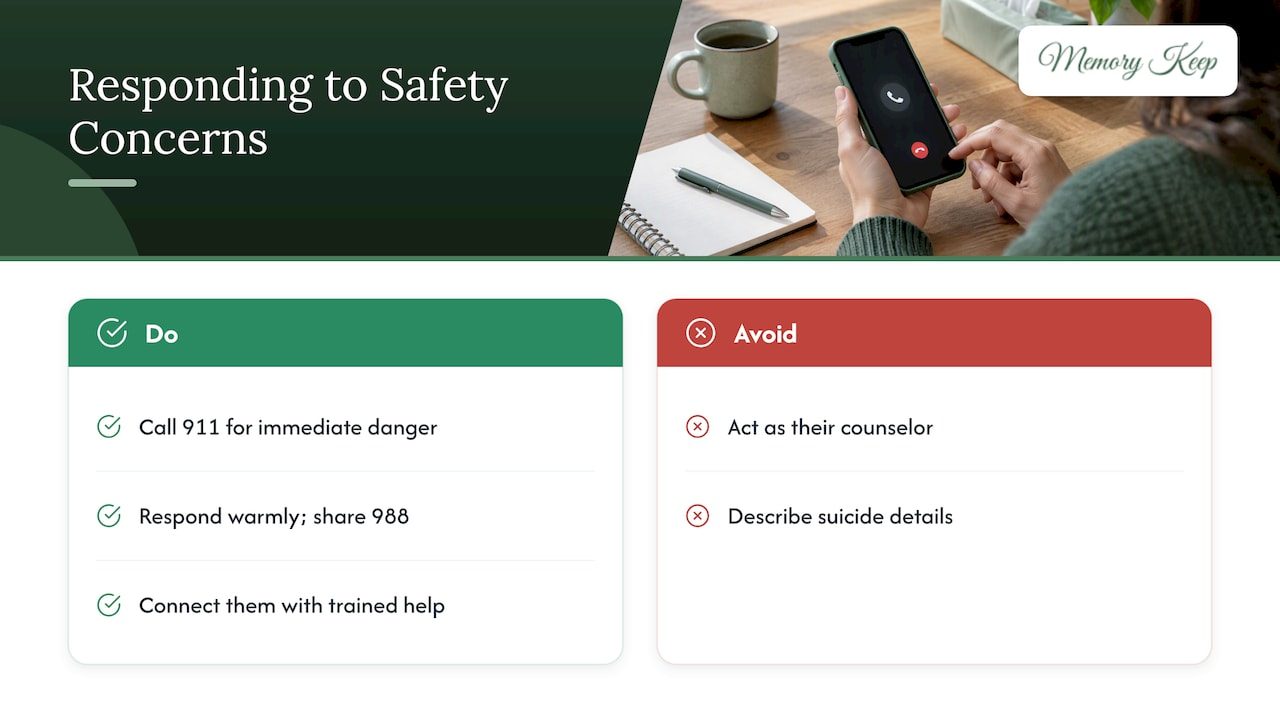
If someone is in immediate danger, such as a stated plan to harm themselves or someone else, call 911. The 988 Lifeline’s guidance for community moderators places contacting local emergency services ahead of any platform rule.
If someone seems to be in emotional distress but not in immediate danger, you can reply with warmth and a resource. The 988 Suicide & Crisis Lifeline can be reached by call or text at 988. A reply might be: “We are so sorry you are hurting. You are not alone. Please call or text 988 to talk with someone right now.”
You are not their counselor. The Lifeline is clear that community moderators are not mental health professionals and should not take on that role. Your job is to connect the person with trained help, not to carry the whole weight yourself. That can feel like not doing enough, but it is the safest and kindest thing you can offer.
After a death by suicide, the Samaritans advises that you avoid describing details of the death and include supportive resources and organizations on the page. Consider adding a line with the 988 number to the page description itself.
If these moments leave you shaken, take care of yourself too. Our grief resources gather support for people carrying a loss of their own.
When the family disagrees about what stays
This is the part nobody writes policies for. A sibling wants to delete a message an aunt thinks is lovely. A former spouse posts something the children find painful. An old friend shares a story that is funny, but not everyone is ready to laugh.
There is no single right answer, and a page that holds one person’s memories of a life will rarely hold everyone’s. A few habits help.
- Agree on a decider before you need one. Often it is the person who created the page, or the closest relative. Say so early, in a short message to the family.
- Separate “hurtful” from “different.” A message that describes the person in a way you do not recognize may still be true to the writer’s experience. Hurtful means it attacks, shames, or exposes someone. Different is simply another view.
- Look for the middle path. If a story is mostly loving but includes one painful line, ask the writer privately whether they would be willing to edit it. Most people say yes.
- Wait twenty-four hours on anything that makes your chest tighten. Hide the message in the meantime if you can.
- Give people another place. If a relative has things to say that do not fit, suggest a private letter, a shared album of their own, or a conversation. A memorial does not have to hold every feeling.
- Let the page evolve. You can revisit decisions. Grief shifts, and what felt unbearable in the first month may feel different a year later.
Our article on the benefits of creating and sharing an online memorial describes how shared remembrance can bring a family together, and that is the aim to keep returning to when tempers rise.
Perspective: why we keep moderation gentle
We built Memory Keep around a simple belief: a memorial should feel like a quiet room where people can come to remember, not a public feed to be managed. That belief shapes how we think about moderation.
We do not run ads and we do not sell data, so nothing about a memorial page is designed to draw in crowds or keep people scrolling. A page can stay small and private, shared by a unique link with the people who matter. In our experience, the best moderation is often prevention: choosing who you share the link with, saying what you hope for at the top of the page, and inviting contributions that are about the person, such as photos, stories, and favorite songs.
We also believe the people running a memorial are mourners first. You should not have to become a full-time moderator while you are grieving. Invite one trusted person to share the work, keep the rules short, and remember that most visitors come with love. When a hard message does appear, you do not owe it a long response. Remove it, keep a record if you need one, and return to the memories that brought you here.
— Memory Keep
Keeping the page warm so there is less to moderate
A page full of loving content leaves less room for the other kind. Some ideas:
- Open with a prompt. “Share a favorite memory” gives visitors a clear direction.
- Add photos and stories early. When the page already feels full of the person, visitors follow its tone.
- Invite specific people to contribute. Collaborative uploads from family and friends make the page a shared project instead of a stage.
- Use a map of life events. An interactive map of places that mattered encourages memories tied to real moments.
- Offer ideas for tribute. Our list of online remembrance ideas includes low-cost ways to honor someone that keep the focus on love.
If relatives live in different places, our guide to memorials across time zones shows how to keep a page open and welcoming for everyone, whatever hour they visit.
Starting a memorial of your own
If you are ready to create a page for a person or a pet, Memory Keep lets you begin for free, with limited uploads and features. The Full plan is a one-time $15 payment for a memorial, with no subscription and no renewal, and it unlocks unlimited photos, videos, and features for that page. Every memorial also comes with a free QR code you can place on a headstone or a card. You can see both plans on our pricing page, or visit Memory Keep to begin.
If you are still finding your footing, our guide to how to support a grieving friend and our twelve essential grief insights may help you and the people around you.
FAQ
Should I approve comments before they appear on a memorial?
It depends on how public the page is. For a private page shared with close family, reviewing afterward is usually enough. For a page that strangers can find, or one connected to a death that drew attention, reviewing first is a gentler choice, because some platforms let you moderate comments before they are public. Check whether your memorial service offers this.
What should I do if someone posts something cruel on a memorial?
Remove or hide it first, then save a screenshot with the date and time, and report it if the platform has a reporting tool. You do not need to argue or explain publicly. If the message includes threats, contact local law enforcement.
What if a comment mentions suicide or self-harm?
If the person may be in immediate danger, call 911. If they seem to be in distress, reply kindly and share the 988 Suicide & Crisis Lifeline, which you can call or text at 988. You are not expected to counsel them, and the Lifeline says moderators should connect people to professional help instead.
How do we decide as a family which messages to keep?
Choose one decision-maker and one backup before the page goes live, and share a few simple rules with everyone. Treat hurtful messages differently from messages that are merely different from your own memory. When you are unsure, hide the message for a day and ask the writer privately about a small edit.
Sources
- Remembering friends or family who have died by suicide in a safe way online, Samaritans
- Anyone Can Become a Troll, Proceedings of the 2017 ACM Conference
- Laws & Policies, Pea Ridge National Military Park
- Comment & Posting Policy, Library of Congress
- Comment Policy, Federal Trade Commission
- Instagram Comment and Posting Policy, National Archives
- Cyberbullying, National Cybersecurity Alliance
- Support for suicidal individuals, 988 Suicide & Crisis Lifeline
- 47 U.S. Code § 230, Cornell Legal Information Institute
- Malwarebytes, Inc. v. Enigma Software Group USA, LLC, Cornell Legal Information Institute