

How to Invite Guests to an Online Memorial Page
You invite people to a memorial page the way you would invite them to sit with you for a while: personally, simply, and with a clear sense of what you hope they will do. Decide who should receive it, write a short note that names your loved one and shares the link, send it through the channel each person actually uses, and tell them gently how they can take part. This guide walks you through each step, with words you can borrow.
TL;DR
- Start with the people closest to your loved one, then widen the circle to friends, neighbors, coworkers and community groups.
- Match the channel to the person: a group text or email for most, a phone call or handwritten note for those who are rarely online.
- Name your loved one, include the link, and say what you are asking: view, add a photo, or write a message.
- Tell guests how to take part, so no one has to guess whether adding a memory is welcome.
- Follow up kindly. Some people will visit quietly and never write a word, and that is perfectly fine.
Table of Contents
- Before you send anything: look at the page as a visitor
- Decide who to invite
- Choose the right way to reach each person
- What to write in the invitation
- Tell guests how they can take part
- Privacy: who can see the page
- Timing: when to send the invitation
- A simple three-message plan
- Leave room for quiet visitors
- Perspective: why we keep the invitation small
- Create a page worth sharing
- FAQ
- Sources
Before you send anything: look at the page as a visitor
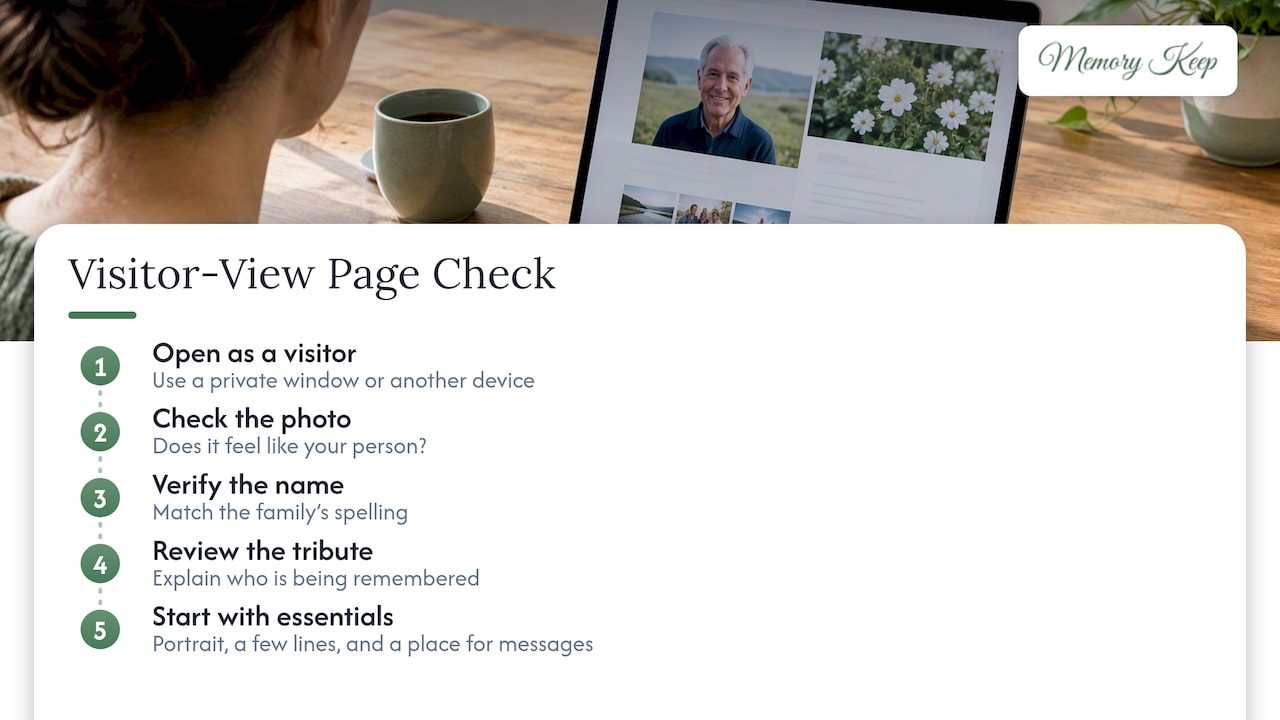
Grief arrives without warning, and sometimes the urge to share comes before the page is ready. That is understandable. Still, take ten quiet minutes to open the memorial in a private browser window or on a different device, the way a cousin in another state would see it.
Check a few small things. Does the first photo feel like your person? Is the name spelled the way the family spells it? Does the tribute say enough that someone arriving for the first time understands who is being remembered? You do not need a finished page. A single portrait, a few lines of tribute and a place for messages is a loving start, and you can add to it over the coming weeks.
If you are still gathering pictures, our guide to starting tonight with one photo shows how a small gallery with captions can be enough to invite others in.
Decide who to invite
The list does not have to be perfect, and it can grow. Think in circles.
- Immediate family and closest friends. These are the people who will want to know first, and who may have photos and stories you do not.
- Extended family and old friends. Cousins, former neighbors, college roommates, people who lost touch but would be grieving too.
- Work, school and community. AARP’s checklist for when a loved one dies suggests notifying friends, family, employers, neighbors, coworkers and relevant social or church groups, by group text, mass email or individual phone calls, and asking recipients to help spread the word.
- People who may not know yet. A teacher, a caregiver, a longtime doctor, a club the person belonged to. A kind message from you may be how they learn.
If the family is spread across countries, our piece on memorials across time zones explains how an open page lets everyone take part on their own schedule.
When the memorial is for a pet
The circle is often smaller but just as tender: the household, the neighbors who knew the dog by name, the vet staff, the friends who watched your cat when you traveled. Invite them in the same way. Grief for a pet is real, and a page of shared photos can help those who loved them feel seen.
Choose the right way to reach each person
No single channel reaches everyone. Funeralwise makes a similar point about celebrations of life: use online channels for broad reach, and call or write personally to people who are less active online. The same applies to a memorial page.
| Channel | Best for | A note on tone |
|---|---|---|
| Group text | Close family and friends who reply quickly | Keep it short and put the link on its own line |
| Wider circles, coworkers, old friends | Use a clear subject line with your loved one’s name | |
| Private message on social media | Friends you mostly talk to there | Send individually, not as a public tag |
| Phone call | Older relatives, anyone not online | Offer to send the link by mail or read it out slowly |
| Handwritten note or card | Those closest to you, or people you wish to honor | Add the link and the QR code if you have one |
| Public post or obituary | Reaching the whole community at once | Share only if you are comfortable with anyone seeing it |
Funeralwise also suggests including event information in the obituary, on social media, and through email or direct messages. If you want to put the memorial link in an obituary, our guide to sharing an obituary online with one link shows how to do it in about an hour.
Reaching people who are not online
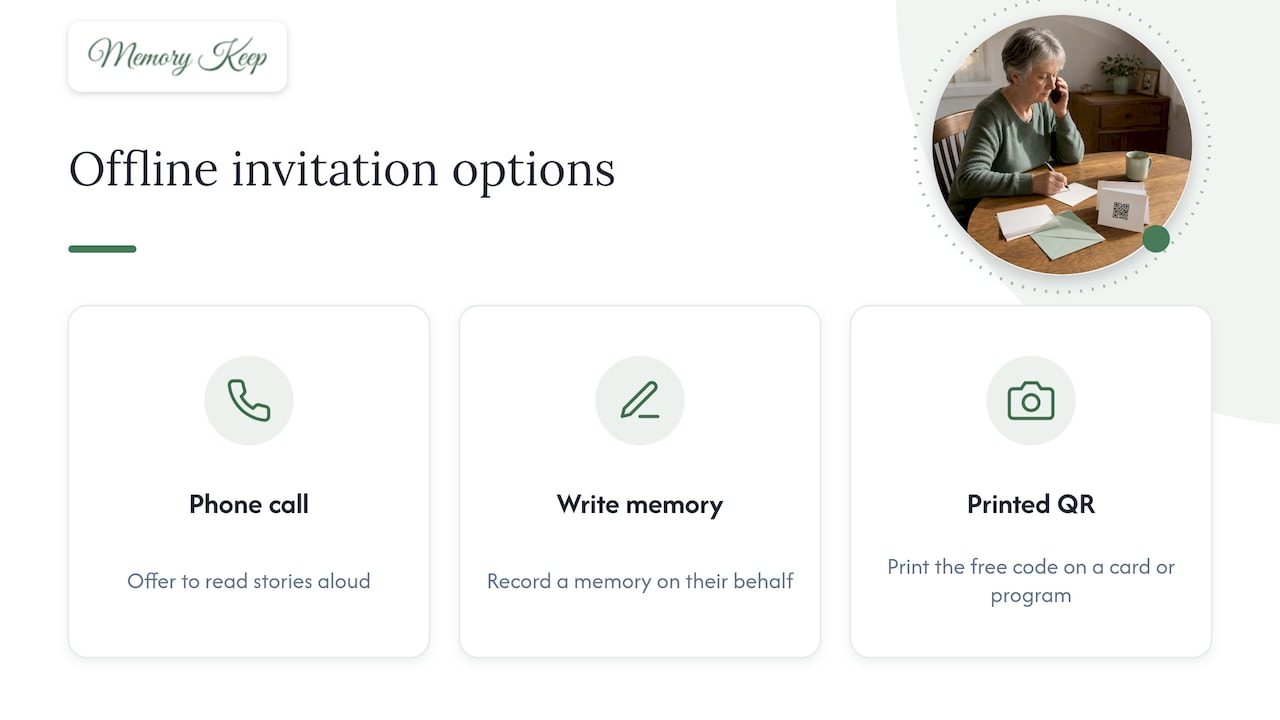
Many grandparents, neighbors and longtime friends will never open a link on their own. A phone call is the invitation. You can say that there is a page with photos and stories, offer to read some aloud, and ask whether they would like you to write down a memory on their behalf. Memory Keep gives every memorial a free scannable QR code, so you can also print it on a card or program for anyone who prefers paper and has a phone nearby.
What to write in the invitation
Better Place’s invitation checklist says a memorial invitation should identify the person who died and, where it applies, give the date, time and location, explain any RSVP or attire request, and include special requests such as adding a photo or signing a guestbook. An online page is more relaxed than a service, so you can keep most of that and drop what does not apply.
A good invitation has four parts:
- Who: their full name, and how you knew them if the message goes beyond family.
- Where: the link, on its own line so it is easy to tap.
- What you hope for: visit, read, add a photo, or share a memory.
- How to take part: a sentence that tells people they are welcome to contribute, and that they do not have to.
Messages you can borrow
Change the words so they sound like you. Gentle and brief is better than polished.
For close family and friends
We have made a place to remember Mom, with photos, stories and room for all of us to add more. You can visit here: [link]. If you have a picture or a memory, we would love for you to share it. There is no rush.
For a wider circle
Dear friends, we are honoring the life of Robert Miller with an online memorial page. You are welcome to look through his photos and leave a message for the family: [link]. Please pass this along to anyone who knew and loved him.
For someone who may not be online
I wanted you to know that we have put together a page of photos and memories of Aunt Rose. I would be glad to show you, or to send you a printed copy of the photos. If you have a story, I would love to add it for you.
For a pet
Our sweet Biscuit is gone, and we have made a little page with his favorite photos. If he made you smile at the park or on the porch, we would love to hear your memory: [link].
To accompany a memorial service
We will gather to remember Linda on [date] at [place]. If you cannot be there in person, you can visit her memorial page here: [link], and leave a message that we will read together.
If you are sending an invitation for a service, remember the practical parts Better Place lists: date, time, location and any request about attire. Leave the details to the official invitation and use the memorial page as a gentle companion to it.
Keep the invitation simple
It is tempting to explain everything: who started the page, why, what the family has been through. Resist that. A short note is easier to answer, and people will be glad of the invitation to do something small and kind. One link, one gentle ask.
Tell guests how they can take part
The quiet reason many people do not write on a memorial page is that they are not sure whether they are allowed to, or what to say. A single sentence solves this.
You might say:
- “You are welcome to add a photo or a story.”
- “Just visiting is enough, and we are glad you came.”
- “If words are hard, a favorite memory in a sentence or two means a great deal to us.”
Memory Keep memorials allow visitors to leave messages of remembrance, and family or friends can contribute photos and videos. If you would like to offer a starting point, our guestbook messages and memory prompts include wording you can copy into your invitation or post on the page itself. Questions such as “What made them laugh?” or “What do you remember about the first time you met?” turn a blank box into a conversation.
Setting expectations for what is shared
You are the host. If you want only photos and not long stories, or only messages and not videos, say so kindly. If a family member has strong feelings about certain pictures, speak with them before the invitation goes out, not afterward. A page that feels safe for the family is a page more people will want to visit.
Privacy: who can see the page
Before you share widely, decide how public you want the memorial to be. A link posted on social media may travel farther than you intend, while a link sent by text stays with the people you chose. Think about it this way:
- Small and private: send the link only by text, email or in a card, and ask guests not to repost it.
- Community-wide: include the link in an obituary or a public post, understanding that anyone who sees it can visit.
Whatever you choose, say it plainly in the invitation, for example: “Please share this only with people who knew and loved her.” On privacy, Memory Keep runs no ads and does not sell data, so a page about your family is not turned into something else. Check the sharing options of any platform you use before posting a link, and do so before you send the first message, not after.
Timing: when to send the invitation
There is no single right moment. Many families send the link in the days after the death, alongside news of a service. Others wait weeks or months, when the first fog has lifted and they have the heart to collect photos. Both are fine.
A few gentle guidelines:
- Around a service: send the link a few days before, so guests can read it ahead of time, and again afterward as a thank-you.
- On an anniversary or birthday: a fresh invitation can bring new memories, and many people find these days easier to share on than the first weeks.
- When you are ready: if you are not, there is no deadline. The page will be there. Memory Keep memorials are permanent, with no renewals to worry about.
If you are planning ahead, perhaps for yourself or a parent, our guide to pre-planning an online memorial walks through the steps and the questions worth settling early.
A simple three-message plan
You do not need a campaign. Three small messages are usually enough.
- The first invitation. Your note with the link, sent to your closest circle first.
- A gentle nudge. After a week or two, a short reminder for people who have not visited: “If you have a moment, there are some lovely new photos on Dad’s page.” Share one thing you have added, so it feels like news rather than pressure.
- A thank-you. Thank those who contributed, and read a message or two aloud at a gathering if that feels right.
That last step matters more than it seems. People remember being thanked for sharing a memory, and it encourages others to add theirs.
Leave room for quiet visitors
Not everyone will write. Some will visit once, read every line, and close the page with tears in their eyes. Some will come back late at night when they cannot sleep. That is a form of remembrance too.
Try not to count messages as a measure of love. Let the invitation say that just looking is welcome. Visitors who feel no pressure are far more likely to return when they are ready.
And for yourself: the person who sends invitations is often the person carrying the most. If the weight of it all feels like too much, speaking with a licensed grief counselor is a reasonable thing to do. Resources such as this page on grief and life stress support can help you find where to begin.
Perspective: why we keep the invitation small
We have seen how much a memorial page can hold, and how easily families feel they must announce it perfectly. We believe the opposite. The most meaningful invitations we can imagine are short, warm, and honest: here is a place to remember someone we love, come when you can.
A memorial is not a performance. It is a quiet room that stays open. That is why we built Memory Keep around a one-time payment with no subscriptions or renewals, strict privacy, and a unique link that lets family and friends anywhere in the world visit without an account or an expectation. Grief is lighter when it is shared, but it is also lighter when no one is rushing you.
So send the link when you are ready, to the people who matter most. Let them add a photo, or just sit with the ones that are there.
— Memory Keep
Create a page worth sharing
If you have not yet made a memorial, you can begin with our free plan and share your page’s link right away. The Full plan is a one-time $15 per memorial, with no subscription, and unlocks unlimited photos, videos and features, along with keepsakes like printable programs and slideshow videos that build themselves from what you have added. See the options on our pricing page.
You might also enjoy our online remembrance ideas for low-cost ways to keep gathering memories after the invitations are sent.
FAQ
How do I invite people to an online memorial page?
Send a short, personal message with the link to the people closest to your loved one first, by text or email. Call or write to anyone who is rarely online. Say who the page is for and how guests can take part, whether that means looking, adding a photo or leaving a message.
What should I say when I share a memorial link?
Name your loved one, put the link on its own line, and add one gentle sentence about what you hope for. For example: “You are welcome to add a photo or a memory, or simply visit.” You can copy any of the sample messages above and adjust the words so they sound like you.
Can I invite people who live far away?
Yes. A memorial page has a unique link, so relatives in other states or countries can visit at any hour and leave a message that the family can read later. Our guide to memorials across time zones suggests pairing the link with one short call so no one feels left out.
Do guests have to leave a message?
No. Say in your invitation that visiting is enough. Many people prefer to read quietly, and some will write later when they find the words. Offering a prompt such as a favorite memory can make it easier for those who do want to contribute.
How do I keep the page limited to the people I choose?
Share the link only through private channels like text, email or cards, and ask guests not to repost it. Avoid putting it in public posts or an obituary if you want a smaller audience. Check the sharing settings on whichever platform you use before you send the first invitation.
Sources
- How to Plan a Celebration of Life, Funeralwise
- 10 Memorial Service Invitation Templates & Examples, Better Place
- Here’s Everything You Need to Do When a Loved One Dies, AARP