
Photo Permission for a Memorial: Who Can Say Yes
In most cases, the person who took the photo owns it, not the person in it and not necessarily the family. If you took the picture yourself, or you received it as a gift from the photographer’s estate, you can usually place it in a memorial. If someone else took it, the kind and safest step is to ask them first and keep their answer. This guide walks you through who to ask, how to ask, and how to share photos gently with the people who matter.
Grief arrives without warning, and paperwork is the last thing you want to think about. Still, a few minutes of care now means a memorial that stays peaceful for years, with no surprise requests to take something down.
TL;DR
- The photographer generally owns a photo’s copyright, and being in the picture does not change that. The U.S. Copyright Office says permission for online use comes from the copyright owner.
- Photos you took yourself are yours to use. For anyone else’s, send a short, specific request and keep the reply.
- A photographer who has died leaves their copyright to heirs, by will or under state law, so ask the estate.
- Consent from people pictured is a separate, kinder question from copyright, especially for children and private moments.
- Cemetery and funeral photography follows the rules of each site, and taking a photo is different from posting it.
Table of Contents
- Why photo permission matters for a memorial
- Who owns the photo of someone who has died
- Copyright permission and the permission of people pictured
- How to ask for permission, step by step
- Photos taken at funerals and cemeteries
- Sharing memorial photos with care
- If someone uses your photo without asking
- Our perspective
- Start your memorial with confidence
- FAQ
- Sources
Why photo permission matters for a memorial
A memorial is a public-feeling place, even when only family visits. Once a photo is on a page that can be shared by link, it is being displayed, and display is one of the things copyright owners control. The Copyright Office notes that owners control copying, derivative works, distribution and public display, including on the internet.
That sounds legal and cold, but in practice it usually comes down to a family conversation. Most relatives are happy to share a picture of someone they loved. Asking simply makes sure no one is hurt later, and it gives people a chance to take part in the tribute.
Who owns the photo of someone who has died
The short answer: the person who pressed the shutter. The Copyright Office explains that the person who takes an original photograph generally owns it initially, whether professional or amateur. Copyright begins when the image is captured, including as a digital file on a phone.
There are a few common situations.
You took the photo
You are the owner. You can place it in a memorial, share it and print it without asking anyone for copyright permission. If other people appear in it, see the section on consent below.
A relative or friend took it
They own it, even if the picture shows your parent, your child or your pet. A text saying “May I add your photo of Grandpa at the lake to his memorial?” is usually all it takes. Photos handed to you in a family album or sent in a group chat were often meant to be shared, but the owner is the one who can say so clearly.
A professional took it
Wedding, portrait, school and studio photographers often keep copyright and grant clients a license for personal use. Your agreement or receipt may say what you can do. If it is unclear, contact the studio and tell them you are creating a tribute. Many will say yes gladly. One exception to the rule: an employment or work-made-for-hire arrangement can make the employer or commissioning party the owner, so a photo taken as part of someone’s job may belong to the company.
The photographer has died
This is common in memorial work, since the person who took the family’s best pictures is often the person being remembered. Copyright interests may pass by will; otherwise they pass to heirs under state law, which can include a surviving spouse or children. If your father took the photos and you are one of his heirs, you likely hold a share of the permission. If there are several heirs, a short message to siblings is a wise courtesy.
The photo came from the internet
A picture being easy to find does not make it free to copy. The Copyright Office is clear that an internet photograph is still protected. If you want a photo from a news site, a friend’s public page or a social profile, ask the person who posted it. For your own loved one’s social accounts, our guide to getting original Instagram photos for a memorial covers how to retrieve the full-quality files.
Copyright permission and the permission of people pictured
These are two different questions, and it helps to keep them apart.
- Copyright asks who made the image and who may allow its use.
- Likeness and privacy ask whether the people shown are comfortable with it.
The Digital Media Law Project explains that consent from the person in a photo addresses likeness issues, while copyright permission is separately needed from the photographer. So a cousin saying “yes, that’s me, go ahead” does not replace the permission of whoever took the picture.
What about the person who has died?
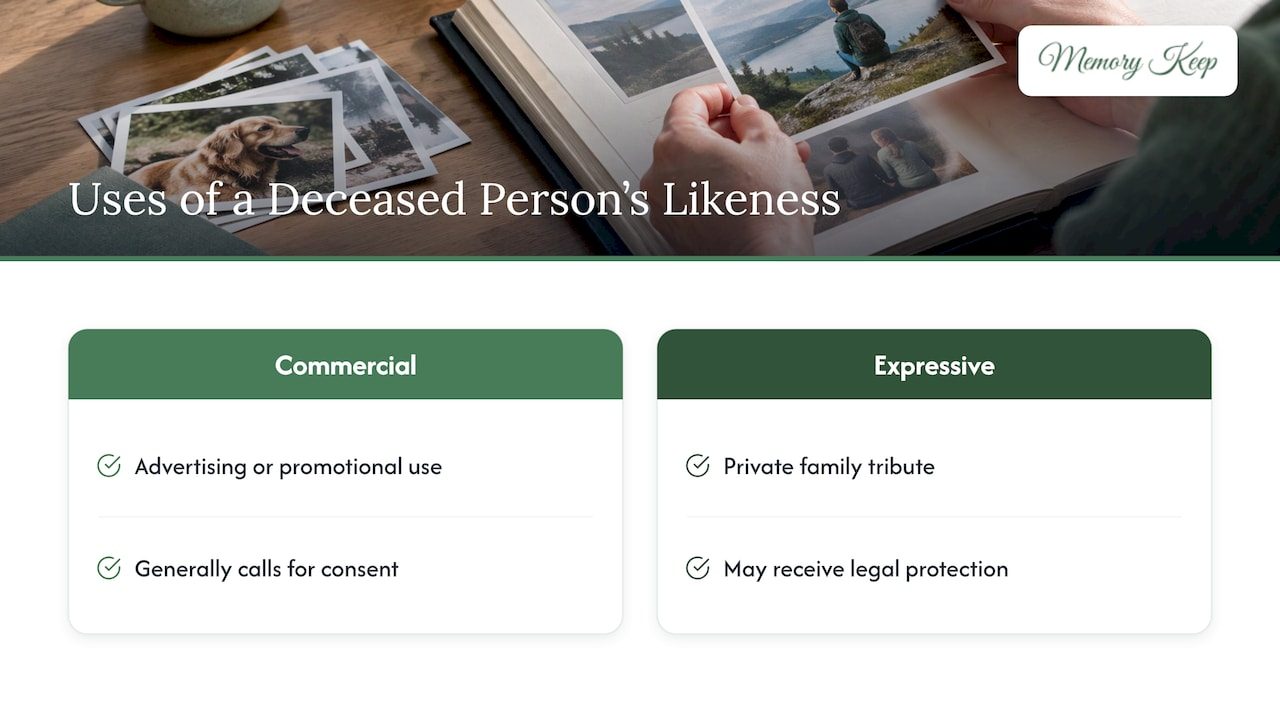
Rules about a deceased person’s likeness are set by states, not by one national law. The American Bar Association reports that post-mortem publicity rights vary by state, including whether the right exists, who enforces it and for how long. Those rights are mostly discussed around commercial uses such as advertising. Commercial or promotional uses generally call for consent, while expressive uses may receive legal protection. A private family tribute is an expressive use, not an advertisement. If you have a specific concern about your state’s rules, a licensed attorney can answer it.
What about living people in the photo?
Use kindness as your guide. For a prominent use, it is wise to seek the subject’s permission and to consider their safety, especially if they cannot consent. In memorial terms, that means:
- Ask adults who appear large in a photo, especially in a private or emotional moment.
- For children, ask a parent or guardian.
- Think about families with sensitive circumstances, such as a relative who prefers not to be found online.
- When in doubt, crop the picture or choose another one.
How to ask for permission, step by step
A good request is short, warm and specific. The Copyright Office’s guidance recommends identifying the work, the intended use, the audience, whether it will be sold, and your contact details. It also notes that only the current copyright owner of that exact material can grant permission, and that ownership may have changed hands since the photo was made.
- Find the owner. Ask yourself who took the photo. If you are not sure, ask relatives who were at the event.
- Describe the photo. Mention the occasion and the year, or attach a small copy so there is no confusion.
- Explain the use. Say it is for an online memorial for a named person, that visitors can view it, and that it is not for sale.
- Offer credit. A caption such as “Photo by Aunt Maria, 1998” often turns a hesitant yes into an enthusiastic one.
- Keep the reply. The Digital Media Law Project advises that permission records should be retained, and recommends consent in writing whenever possible. A text message or email counts as a written record.
A message you can adapt
Hi Maria, we are putting together an online memorial for Dad so family and friends can share memories. May I add your photo of him at the lake from the summer of 1998? It would be shown on the memorial page, with your name as the photographer, and it is not being sold. Thank you, and please tell me if you would rather I didn’t.
If the request itself stirs up feelings, which it often does, give yourself room. Some readers find that a few minutes of simple grounding techniques before reaching out to difficult relatives makes the conversation easier.
Photos taken at funerals and cemeteries
Searches about this topic often mix two questions: may you take a photo, and may you post it. They have different answers.
Cemeteries set their own rules. The Oregon Commission on Historic Cemeteries advises checking the owner’s rules, since owners, including public ones, may impose time, place and manner restrictions. Its example policy bars photographing people visiting graves or attending graveside services without permission. Mount Auburn Cemetery in Massachusetts prohibits photographs of funerals and requires separate permission for public use of photographs shot there, including website posting.
At national cemeteries, the Department of Veterans Affairs says respectful photography of headstones, markers, committal services and burials is allowed, subject to family privacy, decorum and operational limits. Commercial or entertainment filming there needs advance scheduling and an agreement.
What this means for you:
- Photograph your own loved one’s grave freely in most places, but check the cemetery office if you are unsure.
- Keep other mourners out of the frame.
- Ask the funeral home or officiant before photographing a service, and ask guests before posting pictures of them.
- If you plan to post cemetery photos online, read the cemetery’s policy on public use first.
Sharing memorial photos with care
Permission is only half the picture. The other half is deciding who sees what.
A memorial page with a unique link works much like a private invitation: the people you send it to can visit, and you decide whom you send it to. Think through these choices before you publish:
- Share the link deliberately. Send it to family and friends directly rather than posting it widely, if you want a quieter space.
- Choose photos with their subjects in mind. A picture someone would not want seen by coworkers or neighbors can stay in the family album.
- Let contributors credit their own work. When relatives upload photos themselves, they are the ones giving permission, which keeps things simple.
- Keep the tone kind. Visitor messages are a gift, and our guide to keeping tribute comments kind offers gentle ways to guide a page’s tone.
- Use quality files. If you are gathering originals from relatives, our note on memorial photo size explains what resolution works well.
If you want a place to start, one photo and a caption is enough to begin a family gallery tonight, and you can add more as permissions arrive. For printed programs and headstones, our guide to obituary QR codes shows how a code can lead to the page without reprinting.
If someone uses your photo without asking
Sometimes the tables turn: you took a photo and find it in someone else’s tribute. Most of the time this is an innocent oversight, so begin with a gentle message. Keep a record first: screenshots, URLs, dates and evidence of ownership, then ask the poster to remove it, credit you or agree to a license.
If that does not work, the law gives photographers tools. Copyright owners can notify online service providers about infringing material so it can be taken down. For a U.S. work, you must register it before bringing an infringement lawsuit in federal court.
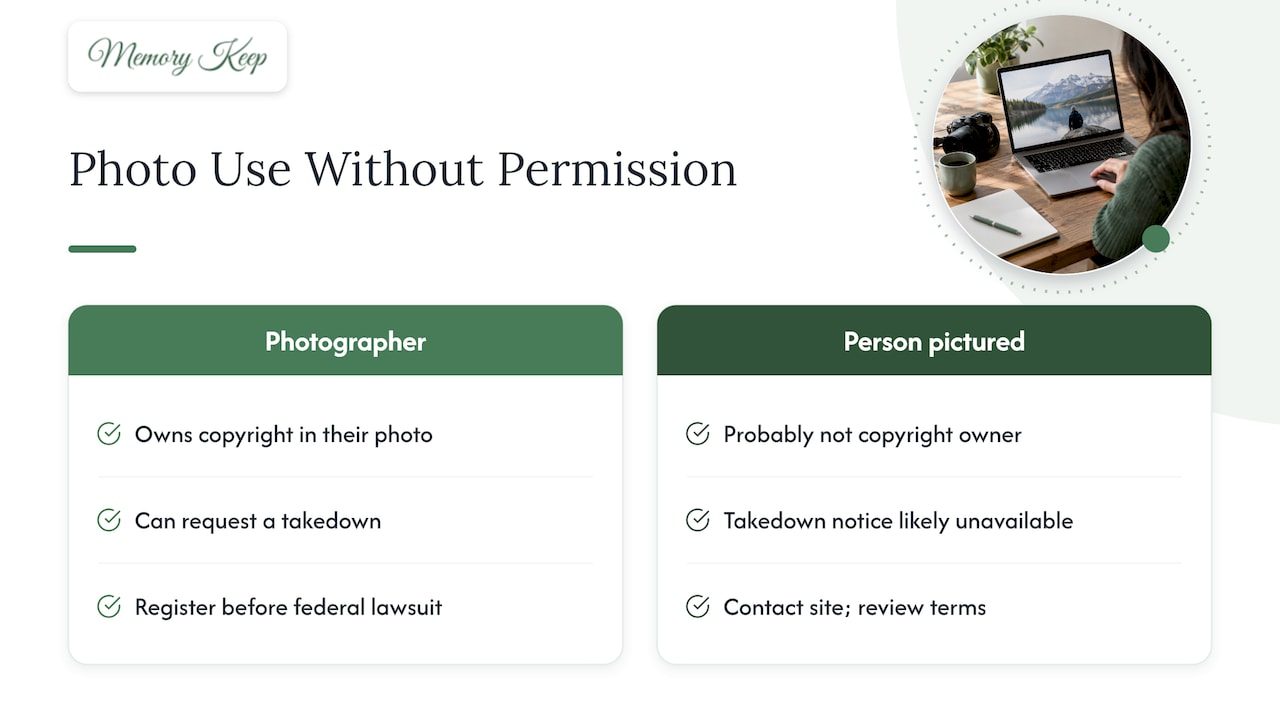
If you appear in the photo but did not take it, the picture is probably not yours in the copyright sense, so a takedown notice is likely not available to you. You can still contact the website, review its terms, look at state privacy or publicity laws, and speak with a licensed attorney.
Our perspective
We have seen how much a single photograph can mean to a family, and how often a memorial stalls because someone is unsure whether they are “allowed” to add it. Our answer is to make asking easy and sharing gentle.
That is why each Memory Keep memorial is built around collaboration: family and friends can contribute their own photos and videos, so the person who took a picture is the one who chooses to share it. A memorial gets richer, and the question of permission is answered in the most natural way.
We also believe a memorial should feel safe. Our approach is built on a one-time payment with no subscriptions or renewals, no ads, and no selling of your data, so what you preserve stays a tribute and not a product. Each page has its own link, so you decide who receives it.
Grief is lighter when it is shared, and shared well. A little care at the start lets everyone come to the page with an open heart.
Memory Keep
Start your memorial with confidence
Once you have gathered the photos you have permission to use, a Memory Keep memorial gives them a lasting home. You can begin with our free plan, which has limited uploads and features, or choose the Full plan for a one-time $15 per memorial and no renewals. Every memorial includes a free scannable QR code, and family can upload their own photos and videos to the same page.
See the plans and pricing or visit Memory Keep to begin. If you would like to see what a finished tribute looks like, Dixie’s memorial is a gentle example. For more ways to honor someone, read about online remembrance ideas.
FAQ
Do I need permission to post a photo of someone who has died?
You need permission from whoever owns the photo’s copyright, usually the photographer or their heirs, not from the person pictured. If you took the photo yourself, you already have it. For anyone else’s picture, a short written yes from the owner is the safest record.
Can I use a photo from a funeral or from social media?
For social media, ask the person who posted it, since public photos are still protected by copyright. For a funeral, ask the family and guests who appear in the pictures, and check the funeral home’s or cemetery’s own policy before posting anything publicly.
Is a text message enough as permission?
A clear text or email that names the photo and the use is a good written record. Keep it somewhere safe. The more specific the request, the better it protects everyone’s wishes.
Can I take photos at a cemetery?
Often yes, especially of your own loved one’s grave, but each cemetery sets its own rules. Many limit photographing other visitors or services, and some require permission to post photos publicly. A quick call to the cemetery office will tell you.
Sources
- Photography, U.S. Copyright Office
- What Photographers Should Know about Copyright, U.S. Copyright Office
- Circular 16A: How to Obtain Permission, U.S. Copyright Office
- The Digital Millennium Copyright Act, U.S. Copyright Office
- Section 512 of Title 17, U.S. Copyright Office
- Using Late Father’s Photography, Copyright Alliance
- Using the Name or Likeness of Another, Digital Media Law Project
- Getting Permission to Use the Work of Others, Digital Media Law Project
- Delebs and Postmortem Right of Publicity, American Bar Association
- Photo Permissions and How to Get Them, University of California Press
- Filming and Photography Guidance in National Cemeteries, U.S. Department of Veterans Affairs
- Oregon Commission on Historic Cemeteries, filming and photography policy
- Photography and Film Guidelines, Mount Auburn Cemetery
- Someone Is Using My Photos: What to Do Next, Berify